wordpress-mobile / wordpress-mobile/WordPress-Android
[Android] Domains v2: Enhance Call-To-Action on My Site
Nobody has claimed this yet.
- Dominant language
- Kotlin
- Stars
- 3.2k
- Forks
- 1.4k
- Avg merge
- 1d 11h
- Merged PRs (30d)
- 69
Description
In order to make the Domains feature more discoverable, we will add a new Call To Action for users that don't have a custom domain yet.
The new Call To Action will be added to the "Next Steps" section (see designs below)
| Without Quick Start | With Quick Start |
|---|---|
 |
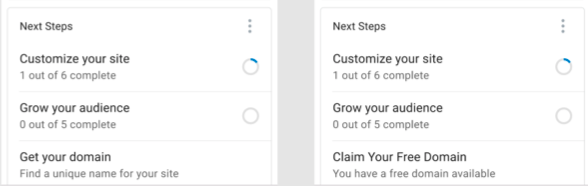 |
The existing Call to Action that appears when a paid user does not have a domain yet, will be replaced by this new one.
The Domains Action in the Configure Section will remain as it is.
NOTE: design have slightly changed compared to these screens, and the Domains Call to Action needs to be the first one when Quick Start is shown
Contributor guide
First steps
- Read the whole issue, then the project's contributing guide.
- Comment on the issue to say you are picking it up — it saves two people doing the same work.
- Fork the repository and make your change on a branch.
- Open a pull request that references the issue number.
Research direction
Start at the Android My Site screen and locate the Next Steps section and its existing paid-user domain call to action. Compare the current layout with the linked designs and the note about Quick Start ordering; done means the new Domains call to action appears first when Quick Start is shown while the Configure section action remains unchanged.
Written by the indexing model from the issue text.
Assessment
- Tech stack
- kotlin
- Domain
- mobile-dev
- Issue type
- Feature
- Difficulty
- 3/5
- Estimated time
- 1-2 days
- Activity status
- Stale
- Clarity
- Mostly clear
- Newbie friendliness
- 45/100