wordpress-mobile / wordpress-mobile/WordPress-Android
[GlobalStep] Two Factor Authentication Screen is displayed as though an Authenticator App is being used even when the method of choice is Text Messages.
Nobody has claimed this yet.
- Dominant language
- Kotlin
- Stars
- 3.2k
- Forks
- 1.4k
- Avg merge
- 1d 11h
- Merged PRs (30d)
- 69
Description
Description
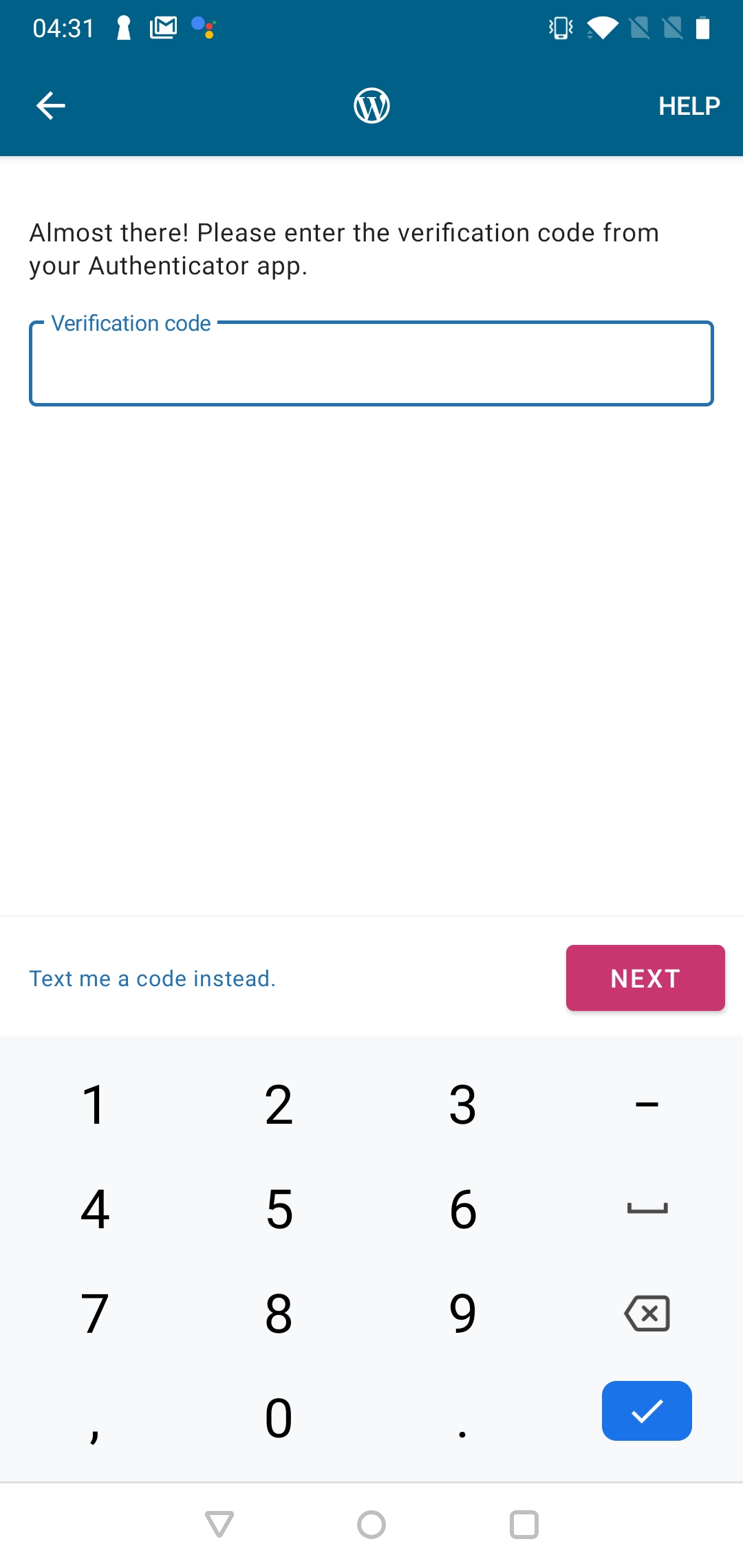
Applying Two Factor Authentication to an account and choosing Text Messages as the Authentication method before attempting to Login causes the message “Almost there! Please enter the verification code from your authenticator app.” and the button that reads “Text me a code instead” to be displayed, even though an Authenticator App is not being used and the text code was already sent.
Reproduction Rate
4/4 100%
Expected behaviour
The Two Factor Authentication screen should accurately reflect the Authentication method of choice.
Actual behaviour
The Two Factor Authentication screen is displayed as an Authenticator App is being used.
Steps to reproduce the behaviour
- Install and launch WordPress 14.7
- Activate Two Factor Authentication for an account and select Text Messages as the Authentication method.
- Enter the credentials for that account to reach the Two Factor Authentication Screen.
Tested on the following
One Plus 6 (9.0)
Samsung Galaxy S8+ (8.0)
Please see the attached screenshot for more information
Submitted by:
Luis Pimenta
Contributor guide
First steps
- Read the whole issue, then the project's contributing guide.
- Comment on the issue to say you are picking it up — it saves two people doing the same work.
- Fork the repository and make your change on a branch.
- Open a pull request that references the issue number.
Research direction
Reproduce the two-factor login flow with Text Messages selected and compare the displayed screen with the reported screenshot and expected behavior. Trace the Android authentication screen and its text-message path; done means the screen accurately identifies SMS verification and does not present authenticator-app wording or an unnecessary alternative button.
Written by the indexing model from the issue text.
Assessment
- Tech stack
- android, kotlin
- Domain
- authentication, mobile
- Issue type
- Bug
- Difficulty
- 3/5
- Estimated time
- 1-2 days
- Activity status
- Stale
- Clarity
- Clearly specified
- Newbie friendliness
- 42/100