wordpress-mobile / wordpress-mobile/WordPress-Android
Settings: learn more element should be combined into a single focusable element
Nobody has claimed this yet.
- Dominant language
- Kotlin
- Stars
- 3.2k
- Forks
- 1.4k
- Avg merge
- 1d 11h
- Merged PRs (30d)
- 69
Description
Steps to reproduce:
- Go to Settings > Accessibility > TalkBack > "Use service" or use the Volume key shortcut.
- In the WordPress app, go to My Sites > Settings > More.
- Swipe right to find the "Learn More" element.
Result: (48s)
This part of the Settings – More screen contains two elements that are focusable for TalkBack: (1) the text field, and (2) the learn more button. TalkBack reads the text of the first element (“You can…”) and finishes with “double tap to activate, double tap and hold to long press.” Double-tapping does nothing, however. Double tapping and holding opens a popup dialog. If the learn more button is focused, double tapping opens the same dialog. This could be improved by combining these two focusable elements into a single focusable element that opens the relevant dialog if activated.
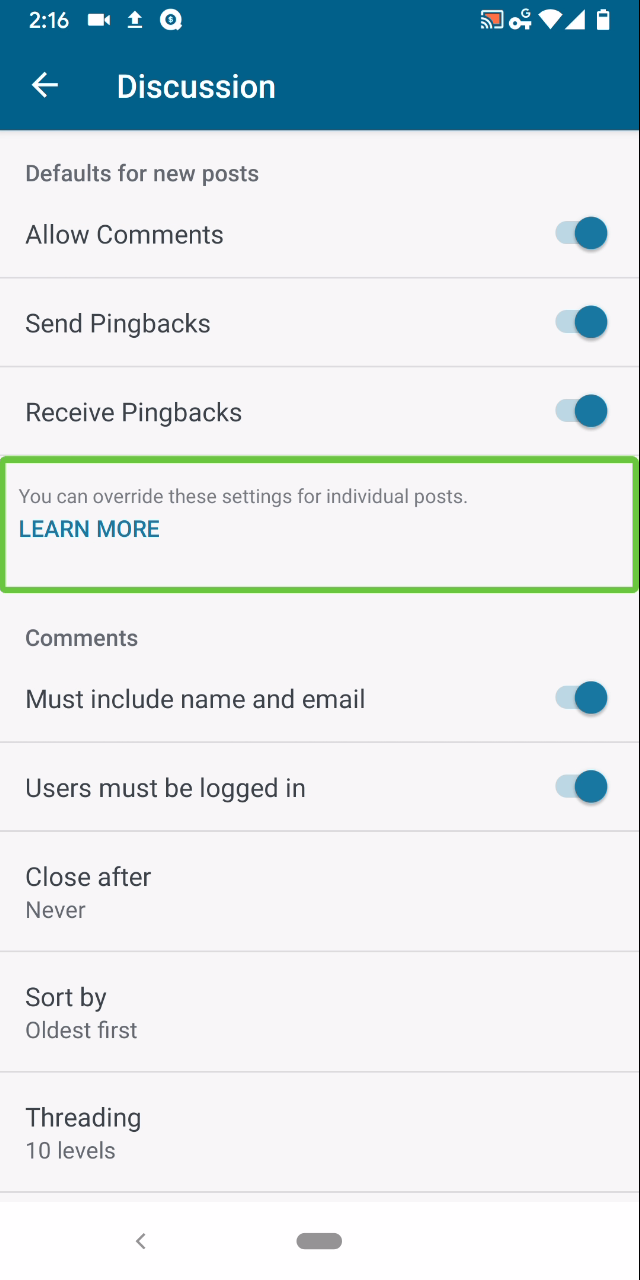 Tested with WPAndroid 13.8-rc-1 on Pixel 3 Android 10.
/hat tip @mchowning for the report, internal reference: p77Llu-c0a-p2
Contributor guide
First steps
- Read the whole issue, then the project's contributing guide.
- Comment on the issue to say you are picking it up — it saves two people doing the same work.
- Fork the repository and make your change on a branch.
- Open a pull request that references the issue number.
Research direction
Start at the WordPress Android Settings > More screen and reproduce the issue with TalkBack using the steps in this report. Inspect the implementation of the Learn More text and button; done means they form one focusable element and activating it opens the relevant dialog.
Written by the indexing model from the issue text.
Assessment
- Tech stack
- android, kotlin
- Domain
- accessibility, mobile
- Issue type
- Bug
- Difficulty
- 3/5
- Estimated time
- 1-2 days
- Activity status
- Stale
- Clarity
- Mostly clear
- Newbie friendliness
- 45/100