wordpress-mobile / wordpress-mobile/WordPress-Android
Media: file details screen labeled as "space", file detail titles are not read if they have content, copy button not labeled as a button
Open
Nobody has claimed this yet.
[Type] Bug
Accessibility
Media
- Dominant language
- Kotlin
- Stars
- 3.2k
- Forks
- 1.4k
- Avg merge
- 1d 11h
- Merged PRs (30d)
- 69
Description
Steps to reproduce:
- Go to Settings > Accessibility > TalkBack > "Use service" or use the Volume key shortcut.
- In the WordPress app, go to My Site > Media.
- Open the global context menu by swiping down then right and double tap "Read from top".
Result: (1m8s)
- On the main media grid, the instruction read aloud for a thumbnail says "double tap to activate, double tap and hold to long-press" but double tapping and holding to long-press does nothing.
- The first focusable item on screen is read as "space".
- Field titles under File Details are not read aloud if they contain content.
- "Copy" button under URL is not labeled as a button.
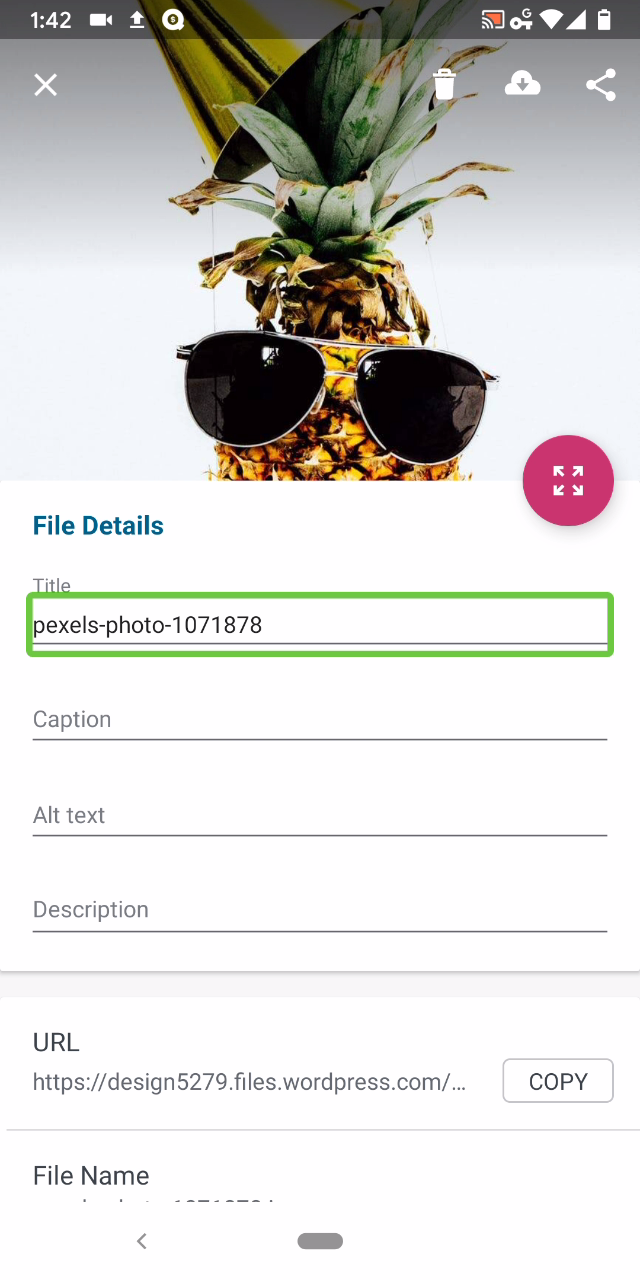 Tested with WPAndroid 13.8-rc-1 on Pixel 3 Android 10.
/hat tip @mchowning for the report, internal reference: p77Llu-c0a-p2
Contributor guide
First steps
- Read the whole issue, then the project's contributing guide.
- Comment on the issue to say you are picking it up — it saves two people doing the same work.
- Fork the repository and make your change on a branch.
- Open a pull request that references the issue number.
Research direction
Reproduce the issue from My Site > Media, then inspect the media grid and File Details screen with TalkBack. Verify the thumbnail instruction, first focusable item, populated field titles, and Copy control; done means each is announced accurately and the Copy control is identified as a button.
Written by the indexing model from the issue text.
Assessment
- Tech stack
- android, kotlin
- Domain
- accessibility, mobile
- Issue type
- Bug
- Difficulty
- 3/5
- Estimated time
- 1-2 days
- Activity status
- Stale
- Clarity
- Mostly clear
- Newbie friendliness
- 35/100