wordpress-mobile / wordpress-mobile/AztecEditor-iOS
Tricky to edit tables within the app
Nobody has claimed this yet.
- Dominant language
- Swift
- Stars
- 669
- Forks
- 153
- Avg merge
- 11h 27m
- Merged PRs (30d)
- 4
Description
Tables appear as a [TABLE] shortcode, which makes it tricky to edit tables within the app, especially if there are multiple tables in one post or page.
Expected behavior
I expected to be able to visualise tables that have been added using HTML to a post or page directly from the editor. This matches up to my experience editing tables in /wp-admin or Calypso.
Actual behavior
Tables that have been created using HTML appear as a [TABLE] shortcode within the editor:
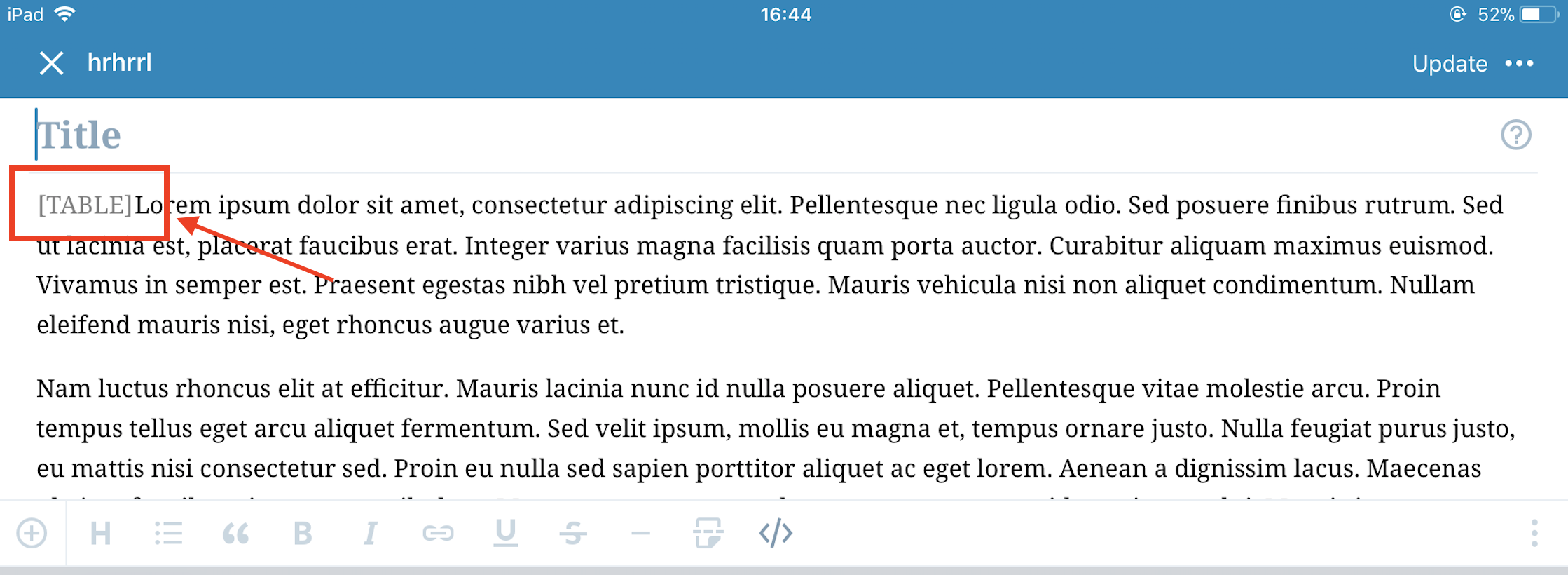
You have to tap on the shortcode to edit the HTML for the table, which isn't that intuitive and doesn't match up to how tables can be edited in editors elsewhere on the web (including WordPress.com's editor).
If a post or page contains multiple tables, it's really tricky to determine the correct one to edit from the shortcode.
Steps to reproduce the behavior
- Copy/paste the following code to a new post or page in a web browser:
<table>
<tbody>
<tr>
<th>Company</th>
<th>Contact</th>
<th>Country</th>
</tr>
<tr>
<td>Alfreds Futterkiste</td>
<td>Maria Anders</td>
<td>Germany</td>
</tr>
<tr>
<td>Centro comercial Moctezuma</td>
<td>Francisco Chang</td>
<td>Mexico</td>
</tr>
<tr>
<td>Ernst Handel</td>
<td>Roland Mendel</td>
<td>Austria</td>
</tr>
<tr>
<td>Island Trading</td>
<td>Helen Bennett</td>
<td>UK</td>
</tr>
<tr>
<td>Laughing Bacchus Winecellars</td>
<td>Yoshi Tannamuri</td>
<td>Canada</td>
</tr>
<tr>
<td>Magazzini Alimentari Riuniti</td>
<td>Giovanni Rovelli</td>
<td>Italy</td>
</tr>
</tbody>
</table>
- Edit that post or page in the mobile app.
Tested on iPad Mini, iOS 11.2.5, Aztec 9.2
Contributor guide
First steps
- Read the whole issue, then the project's contributing guide.
- Comment on the issue to say you are picking it up — it saves two people doing the same work.
- Fork the repository and make your change on a branch.
- Open a pull request that references the issue number.
Research direction
Start by reproducing the HTML table case in the Aztec iOS editor described in the issue, including a post with multiple tables, and trace how tables become [TABLE] shortcodes. Done means tables are visualized in the editor and multiple tables can be distinguished and edited without relying on ambiguous shortcode text.
Written by the indexing model from the issue text.
Assessment
- Tech stack
- html, swift
- Domain
- frontend, mobile
- Issue type
- Feature
- Difficulty
- 4/5
- Estimated time
- 3-5 days
- Activity status
- Stale
- Clarity
- Mostly clear
- Newbie friendliness
- 35/100