willowtreeapps / willowtreeapps/vocable-android
Categories List Screen Does Not Display Pagination Label For Single Page
Nobody has claimed this yet.
- Dominant language
- Kotlin
- Stars
- 127
- Forks
- 21
- Avg merge
- 16m
- Merged PRs (30d)
- 4
Description
Description:
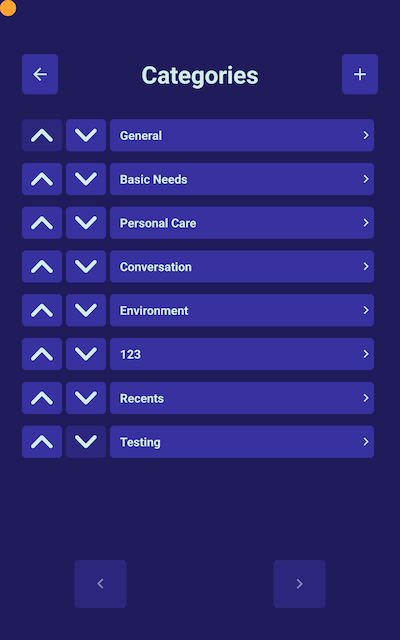
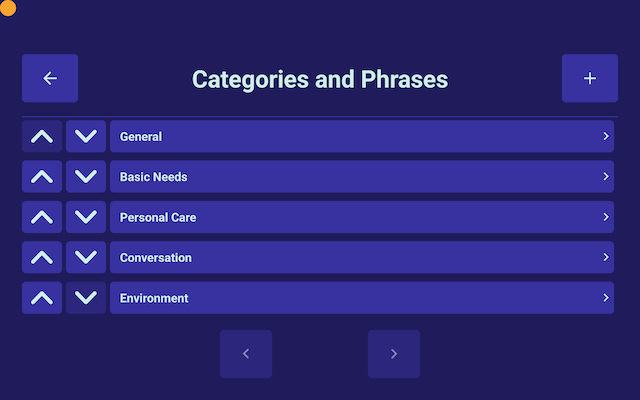
When viewing the Settings > Categories and Phrases > categories list screen, if there are only enough categories for one page then the pagination label is not displayed. For consistency with the rest of the app, there should be a "Page 1 of 1" label displayed between the page left/right buttons.
Reproduced on develop.
Steps To Reproduce:
Phone:
- Assuming more than 2 categories in the app...
- Navigate to Settings > Categories and Phrases
- Delete categories until only enough remain that there is only one page of categories
- Note that the pagination label is missing
Tablet:
- Rotate the device to been in
portrait - Navigate to Settings > Categories and Phrases
- Note that the pagination label is missing
- Rotate the device to be in
landscape - Delete categories until only enough remain that there is only one page of categories
- Note that the pagination label disappears
Expected behavior
The pagination label remains and displays as "Page 1 of 1"
Actual Behavior
The pagination label is missing/removed. Even if you rotate your device so that there are more than multiple pages, once you return to a single page the label will disappear if you leave and return to the screen.
Devices:
- Pixel 5 phone, Nexus 10 tablet (both emulated)
- Android 12 (both)
- reproduced on
develop
Screenshots
Contributor guide
First steps
- Read the whole issue, then the project's contributing guide.
- Comment on the issue to say you are picking it up — it saves two people doing the same work.
- Fork the repository and make your change on a branch.
- Open a pull request that references the issue number.
Research direction
Start by reproducing the issue on develop in the Settings > Categories and Phrases categories list screen, using the phone and tablet steps described. Trace the pagination controls and label for a single-page category list, including after rotation and returning to the screen. Done means the label remains visible and reads "Page 1 of 1" when only one page is available.
Written by the indexing model from the issue text.
Assessment
- Tech stack
- android, kotlin
- Domain
- mobile
- Issue type
- Bug
- Difficulty
- 2/5
- Estimated time
- 1-3 hours
- Activity status
- Stale
- Clarity
- Clearly specified
- Newbie friendliness
- 48/100