willowtreeapps / willowtreeapps/vocable-android
When navigating to the custom phrase creation screen show a blinking cursor instead of the "Start typing..." message
Nobody has claimed this yet.
- Dominant language
- Kotlin
- Stars
- 127
- Forks
- 21
- Avg merge
- 16m
- Merged PRs (30d)
- 4
Description
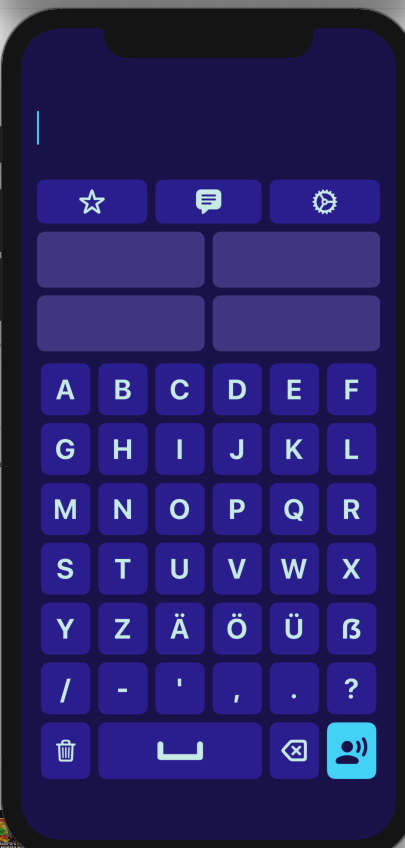
iOS has implemented cursor functionality when navigating the custom phrase screen. This cursor is just a placeholder and does not allow you to move within the actual phrase.
Steps:
- Launch application
- Bring up the custom phrase keyboard
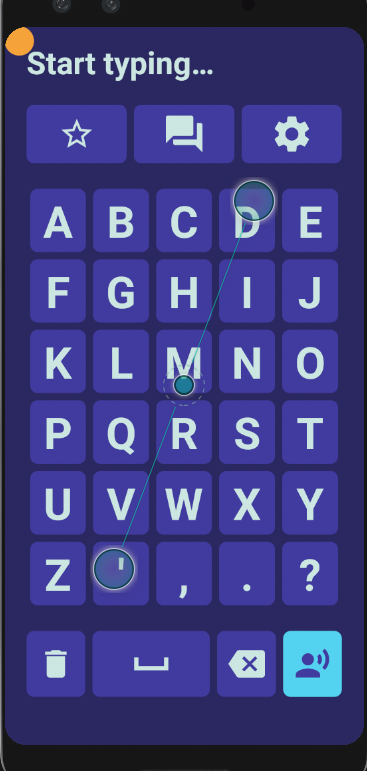
Result: Start Typing... message is displayed
Expected: We should show a typing cursor instead and remove the "Start typing..." text to match iOS
iOS:
Android:
Contributor guide
First steps
- Read the whole issue, then the project's contributing guide.
- Comment on the issue to say you are picking it up — it saves two people doing the same work.
- Fork the repository and make your change on a branch.
- Open a pull request that references the issue number.
Research direction
Start by launching the Android application and opening the custom phrase keyboard to reproduce the current "Start typing..." state. Trace the custom phrase creation screen's placeholder behavior and compare it with the iOS reference. Done means the text is removed and a blinking, non-editable cursor placeholder is shown when the screen opens.
Written by the indexing model from the issue text.
Assessment
- Tech stack
- android, kotlin
- Domain
- mobile
- Issue type
- Feature
- Difficulty
- 2/5
- Estimated time
- 1-3 hours
- Activity status
- Stale
- Clarity
- Clearly specified
- Newbie friendliness
- 38/100