Command Search palette shortcut resets at every relaunch
Nobody has claimed this yet.
Assessment
- Difficulty
- 3/5
- Estimated time
- 1-2 days
- Newbie friendliness
- 48/100
Research direction
Reproduce the shortcut change in Warp's Settings > Keyboard Shortcuts on macOS, then relaunch the app and compare the AI Command Search shortcut with another changed shortcut such as History. Trace where keyboard shortcut settings are saved and restored; done means the custom AI Command Search shortcut remains after closing and reopening Warp.
Written by the indexing model from the issue text.
Description
Discord username (optional)
filippocld#7785
Describe the bug
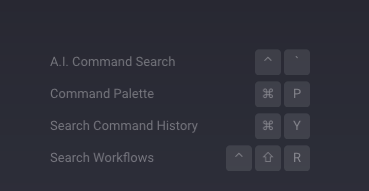
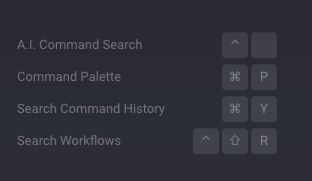
I want to set a new keyboard shortcut for the AI Command Search
To Reproduce
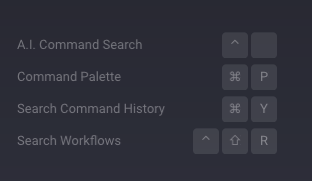
1.go into settings, keyboard shortcuts and set my Ctrl+Space shortcut.
2.close and reopen the app (and thus, also when i reboot my mac),
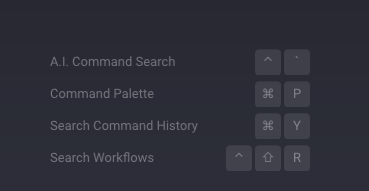
Result: all other changed shortcuts (such as the History one) stay just like i set them. The AI Command Search shortcut, though, goes back to Ctrl+'
Expected behaviour
I expect the new keyboard shortcut to actually save like the others do
Screenshots
After setting the shortcut
After reopening the app
Operating System
MacOS
OS Version
13.0
Shell Version
zsh 5.8.1 (x86_64-apple-darwin22.0)
Warp Version
v0.2022.10.04.08.05.stable_00
Additional context
No response
Does this block you from using Warp daily?
No
Warp Internal (ignore): linear-label:b8107fdf-ba31-488d-b103-d271c89cac3e
No response
- Dominant language
- Rust
- Stars
- 65.1k
- Forks
- 5.6k
- PR merge metrics
- PR metrics pending
Contributor guide
First steps
- Read the whole issue, then the project's contributing guide.
- Comment on the issue to say you are picking it up — it saves two people doing the same work.
- Fork the repository and make your change on a branch.
- Open a pull request that references the issue number.
More from warpdotdev/warp
-
area:agent area:window-tabs-panes enhancement needs-info os:mac repro:high triaged
Difficulty 2/5 1-3 hours Newbie friendliness 68/100
warpdotdev/warp#15768 · 3 comments · 1 reaction ·
-
bug factory-auto-implement factory:revops-factory os:mac ready-to-implement repro:high triaged warp:auto-triage-review
Difficulty 1/5 Under an hour Newbie friendliness 90/100
warpdotdev/warp#15697 · 2 comments ·
-
area:editor-notebooks bug repro:high triaged warp:auto-triage-review warp:tracking
Difficulty 2/5 1-3 hours Newbie friendliness 82/100
warpdotdev/warp#13949 · 3 comments ·
-
markdown_parser: unclosed `<u>` markers pair via the emphasis algorithm and delete surrounding text Openarea:editor-notebooks bug ready-to-implement repro:high triaged warp:auto-triage-review
Difficulty 2/5 1-3 hours Newbie friendliness 78/100
warpdotdev/warp#12863 · 2 comments ·
-
bug
Difficulty 2/5 1-3 hours Newbie friendliness 76/100
warpdotdev/warp#11969 · 2 comments ·
Similar issues
-
Difficulty 2/5 1-3 hours Newbie friendliness 86/100
kwakseongjae/auto-hwp#319 ·
-
area:cli bug filter-quality good first issue priority:medium
Difficulty 2/5 1-3 hours Newbie friendliness 84/100
-
Difficulty 1/5 Under an hour Newbie friendliness 72/100
bevyengine/bevy#25861 ·
-
comp-datalake
Difficulty 2/5 1-3 hours Newbie friendliness 88/100
ClickHouse/ClickHouse#121222 ·
-
enhancement remote
Difficulty 2/5 1-3 hours Newbie friendliness 68/100