[特性改进] 编辑模式的自动换行+表格列对齐
Open
Nobody has claimed this yet.
- Dominant language
- C++
- Stars
- 13k
- Forks
- 1.3k
- Avg merge
- 14h 3m
- Merged PRs (30d)
- 3
Description
OS Version: Win10
VNote Version: 2.3 Win64
Symptoms:
- 如何在编辑模式,打开/关闭自动换行 (word wrap)。
我找了编辑菜单和设置都没有发现这个功能。
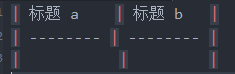
对于像正文这种文字,自动换行是明智的。但是其它情况,例如,列数很多的表格,自动换行则比较混乱。 - (编辑模式下)一旦表格中出现中英文混合字符,表格的列很难与标记 | --- | 中的 | 对齐。
这可能与字体渲染有关。无论设置什么字体(我尝试过 Consolas、和 mod 的 Yahei Consolas Hybrid 都不行),表格中的字体总是“宋体”。
Contributor guide
No contributing guide indexed for this repository
First steps
- Read the whole issue, then the project's contributing guide.
- Comment on the issue to say you are picking it up — it saves two people doing the same work.
- Fork the repository and make your change on a branch.
- Open a pull request that references the issue number.
Research direction
Start by reproducing the two behaviors in VNote 2.3 on Windows 10: locate the edit-mode menu or settings flow for toggling word wrap, then inspect how mixed Chinese and English characters affect Markdown table column alignment. Done means word wrap can be controlled in edit mode and table columns align consistently for the reported mixed-character case.
Written by the indexing model from the issue text.
Assessment
- Tech stack
- cpp, markdown
- Domain
- content, desktop
- Issue type
- Feature
- Difficulty
- 4/5
- Estimated time
- 3-5 days
- Activity status
- Stale
- Clarity
- Mostly clear
- Newbie friendliness
- 30/100