Vim Vision Block feature in view in vim mode
Nobody has claimed this yet.
- Dominant language
- C++
- Stars
- 13k
- Forks
- 1.3k
- Avg merge
- 14h 3m
- Merged PRs (30d)
- 3
Description
Is your feature request related to a problem? Please describe.
Its difficult to edit/highlight multiple lines in the editor while using view mode in vim mode.
For example if you see below string block, we have to move the cursor line by line to highlight then remove the ---
--- Test1
--- Test2
Describe the solution you'd like
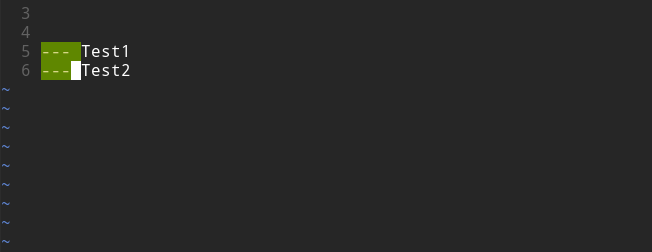
Enable Visual Block(Ctrl+v) similar to vim. In above example, we could just Ctrl+v and move around then we can just d to remove the ---.
Not just remove, it will allow to copy multiple line easily as well.
Describe alternatives you've considered
I tried to use Tasks but it kinda like adding more work into the workflow for just a simple function.
Additional context
I used Joplin before and they already have this feature in their vim mode. Its better for vnote to have this feature in vim modeas well as easier transition from Vim.
How Visual Block works in VIM:
Contributor guide
No contributing guide indexed for this repository
First steps
- Read the whole issue, then the project's contributing guide.
- Comment on the issue to say you are picking it up — it saves two people doing the same work.
- Fork the repository and make your change on a branch.
- Open a pull request that references the issue number.
Research direction
The issue does not name files or tests. Start by locating vnote's Vim-mode editor entry point and existing selection handling; compare the requested Ctrl+v visual-block behavior with current modes. Done means rectangular selections can be moved, deleted, and copied within Vim mode.
Written by the indexing model from the issue text.
Assessment
- Tech stack
- cpp, vim
- Domain
- desktop
- Issue type
- Feature
- Difficulty
- 4/5
- Estimated time
- 3-5 days
- Activity status
- Stale
- Clarity
- Mostly clear
- Newbie friendliness
- 42/100