CSS里用了pseudo-element,渲染后拷贝到公众号编辑器中效果失效,段落间隔好像也有问题。
Nobody has claimed this yet.
- Dominant language
- C++
- Stars
- 13k
- Forks
- 1.3k
- Avg merge
- 14h 3m
- Merged PRs (30d)
- 3
Description
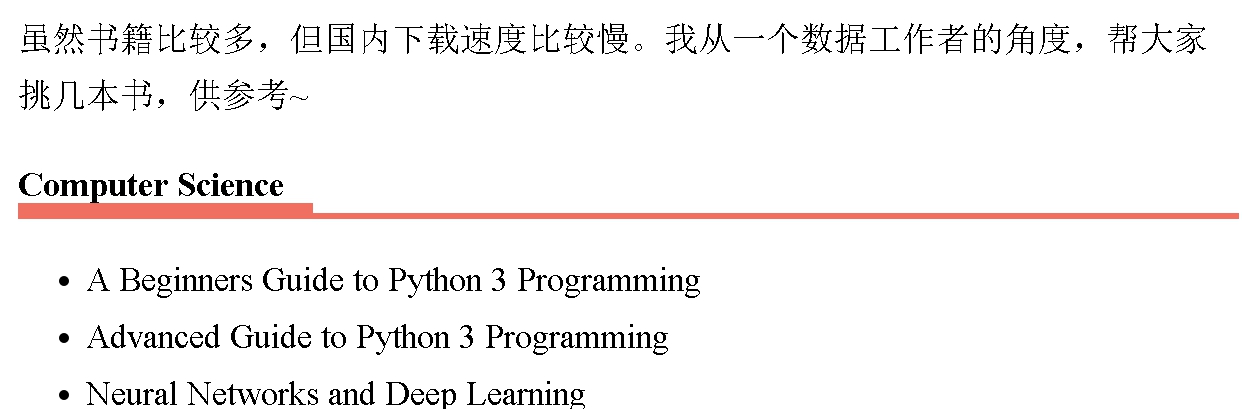
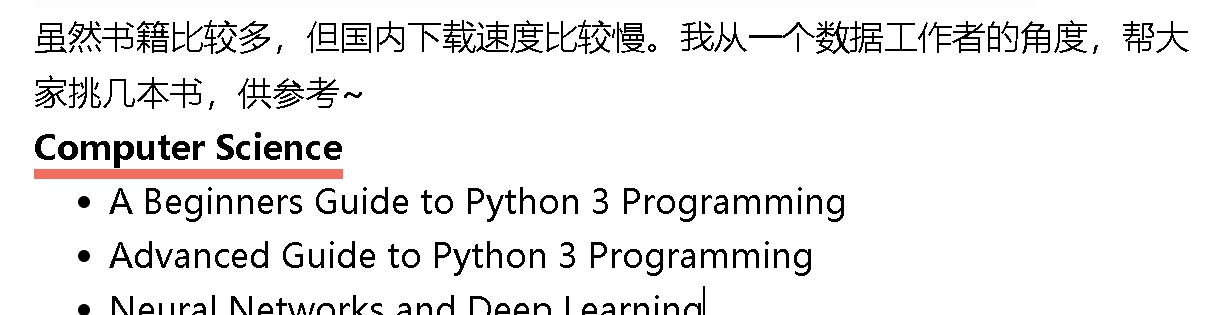
我在CSS里用了::after建了pseudo-element, 在Vnote的选的markdown-it渲染器,效果可以出来,但是我右键选拷贝到公众号编辑器中,好像就失效了,还有就是段落的间距好像也不对了。
自定义的CSS:
`h2 {
display:inline; /from long bottom line to short bottom line/
border-bottom: 3px solid rgb(239, 112, 96);
}
h2::after {
content:"";
display:block;
border-top:3px solid red;
margin-top:4px;
}`
Vnote中的效果:
复制到公众号编辑器后的效果:
我的系统: Win 10, Vnote: 2.8. 2
Contributor guide
No contributing guide indexed for this repository
First steps
- Read the whole issue, then the project's contributing guide.
- Comment on the issue to say you are picking it up — it saves two people doing the same work.
- Fork the repository and make your change on a branch.
- Open a pull request that references the issue number.
Research direction
Reproduce the issue on Windows 10 with Vnote 2.8.2, using the markdown-it renderer and the supplied h2::after CSS, then trace the copy-to-public-account-editor entry point. Done means copied content preserves the pseudo-element styling and correct paragraph spacing.
Written by the indexing model from the issue text.
Assessment
- Tech stack
- css, markdown
- Domain
- content, desktop
- Issue type
- Bug
- Difficulty
- 4/5
- Estimated time
- 3-5 days
- Activity status
- Stale
- Clarity
- Mostly clear
- Newbie friendliness
- 35/100