how to solve the no such file or directory 'node'
Nobody has claimed this yet.
- Dominant language
- TypeScript
- Stars
- 44.7k
- Forks
- 3.6k
- Avg merge
- 21m
- Merged PRs (30d)
- 1
Description
hello, I am linux user and I use hyper as main terminal, recently I encountered a problem
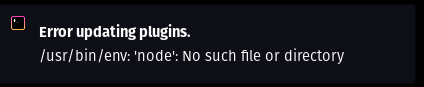
this appears as soon as you install some theme or plugin, besides the themes and plugins were not working
to solve the problem of the plugins not working I went into the ~/.hyper_plugins folder and typed npm add . after that it started working again.
but the message still appeared so I noticed that in my root npm was not found
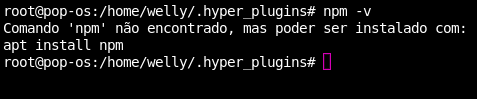
the same for node.
so I just installed it and it worked normally again so far, I decided to open this issue in case anyone else has this same problem,
Contributor guide
No contributing guide indexed for this repository
First steps
- Read the whole issue, then the project's contributing guide.
- Comment on the issue to say you are picking it up — it saves two people doing the same work.
- Fork the repository and make your change on a branch.
- Open a pull request that references the issue number.
Research direction
Start by reviewing the Linux setup described in the issue and the ~/.hyper_plugins installation path, then verify how Hyper finds node and npm when themes or plugins are installed. Done means reproducing the reported error, identifying a clear project-side change, and confirming that themes and plugins work without the message.
Written by the indexing model from the issue text.
Assessment
- Tech stack
- node.js
- Domain
- cli
- Issue type
- Bug
- Difficulty
- 4/5
- Estimated time
- 3-5 days
- Activity status
- Stale
- Clarity
- Needs clarification
- Newbie friendliness
- 25/100