Do themes work the same on Windows?
Nobody has claimed this yet.
- Dominant language
- TypeScript
- Stars
- 44.7k
- Forks
- 3.6k
- Avg merge
- 21m
- Merged PRs (30d)
- 1
Description
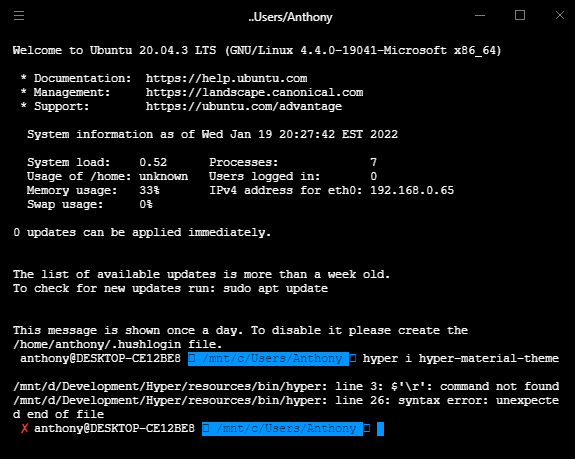
I am using Hyper on a Windows PC and pointing it to my Linux VM (wsl.exe).
My Hyper window is a totally solid black and a default font I don't love. I was trying to install the material theme using the hyper i hyper-material-theme command but got the error shown in my screenshot. How do I install themes? Is this a Windows issue?
Contributor guide
No contributing guide indexed for this repository
First steps
- Read the whole issue, then the project's contributing guide.
- Comment on the issue to say you are picking it up — it saves two people doing the same work.
- Fork the repository and make your change on a branch.
- Open a pull request that references the issue number.
Research direction
Start by reproducing the hyper i hyper-material-theme command on Windows with the reported WSL setup and inspect the screenshot's installation error. Done means determining whether theme installation differs on Windows and documenting or fixing the cause so the material theme can be installed successfully.
Written by the indexing model from the issue text.
Assessment
- Domain
- cli, desktop
- Issue type
- Bug
- Difficulty
- 4/5
- Estimated time
- 3-5 days
- Activity status
- Stale
- Clarity
- Needs clarification
- Newbie friendliness
- 25/100