Clear Buffer creating huge whitespace gaps on Windows.
Nobody has claimed this yet.
- Dominant language
- TypeScript
- Stars
- 44.7k
- Forks
- 3.6k
- Avg merge
- 21m
- Merged PRs (30d)
- 1
Description
- I am on the latest Hyper.app version
- I have searched the issues of this repo and believe that this is not a duplicate
- OS version and name: Windows 10 Pro [Version 1909 (OS Build 18363.592)]
- Hyper.app version: 3.0.2 Stable
- Link of a Gist with the contents of your .hyper.js: https://gist.github.com/zyxxyzyxz/494e4607155cf110fa83317e6d86f1ba
- Relevant information from devtools (CMD+ALT+I on macOS, CTRL+SHIFT+I elsewhere): N/A
Issue
EDIT:
I did type some stuff here but I managed to figure out what was causing it, so I'm editing.
It appears using Clear Buffer on Windows is causing huge whitespace gaps depending on the size of your previous buffer.
For example, you can see below with a small-sized buffer it only skips 1-2 lines;


But with a larger buffer, it causes much bigger whitespace gaps as shown below;
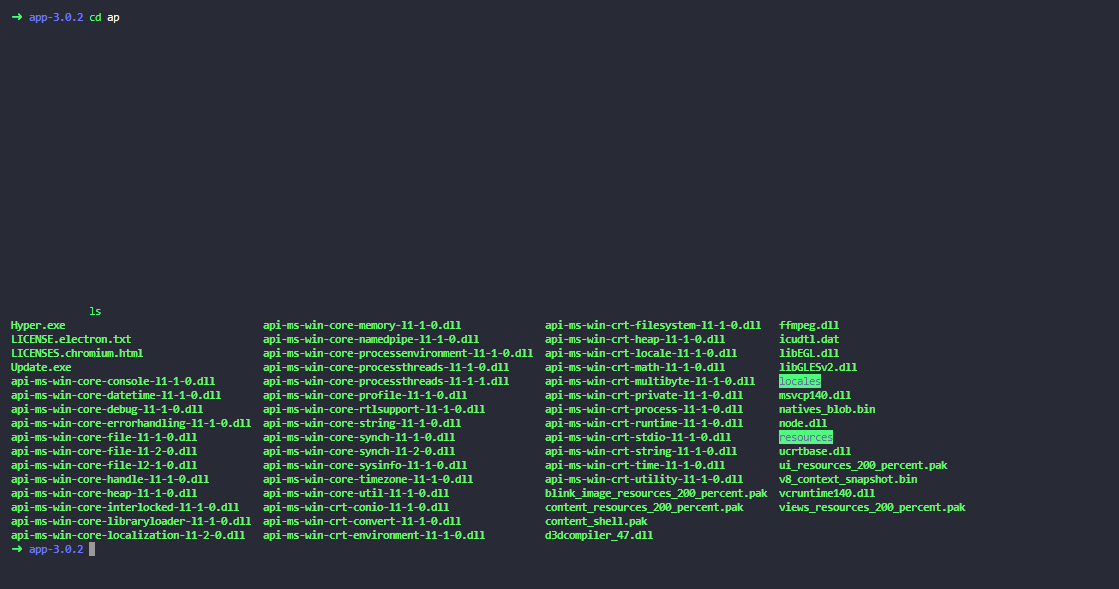

Hopefully this can be fixed.
Contributor guide
No contributing guide indexed for this repository
First steps
- Read the whole issue, then the project's contributing guide.
- Comment on the issue to say you are picking it up — it saves two people doing the same work.
- Fork the repository and make your change on a branch.
- Open a pull request that references the issue number.
Research direction
Reproduce Clear Buffer on Windows 10 with both small and large terminal buffers, then trace the terminal buffer-clearing entry point. Done means clearing the buffer no longer creates whitespace gaps that grow with the previous buffer size.
Written by the indexing model from the issue text.
Assessment
- Tech stack
- typescript
- Domain
- cli, desktop
- Issue type
- Bug
- Difficulty
- 3/5
- Estimated time
- 1-2 days
- Activity status
- Stale
- Clarity
- Mostly clear
- Newbie friendliness
- 38/100