Pasting in large command in native Windows shell breaks rendering
Nobody has claimed this yet.
- Dominant language
- TypeScript
- Stars
- 44.7k
- Forks
- 3.6k
- Avg merge
- 21m
- Merged PRs (30d)
- 1
Description
- I am on the latest Hyper.app version
- I have searched the issues of this repo and believe that this is not a duplicate
-
OS version and name: Windows 10 Pro Insider Preview (Build 19563.rs_prerelease.191211-146)
-
Hyper.app version: 3.0.2
-
Link of a Gist with the contents of your .hyper.js: Per the Windows location defined in https://github.com/zeit/hyper/issues/1134, the file doesn't seem to exist or is empty. Otherwise, it's going to be default (100% fresh install as of 5 minutes ago).
-
Relevant information from devtools (CMD+ALT+I on macOS, CTRL+SHIFT+I elsewhere): N/A
-
The issue is reproducible in vanilla Hyper.app: Yes.
Issue
Just downloaded and installed Hyper on Windows, Ran the chocolatey install command and it rendered super incorrectly:
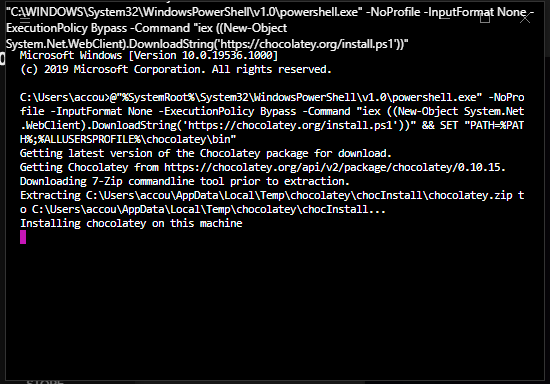
The command can be found on this page. Here it is:
@"%SystemRoot%\System32\WindowsPowerShell\v1.0\powershell.exe" -NoProfile -InputFormat None -ExecutionPolicy Bypass -Command "iex ((New-Object System.Net.WebClient).DownloadString('https://chocolatey.org/install.ps1'))" && SET "PATH=%PATH%;%ALLUSERSPROFILE%\chocolatey\bin"
Rendering was totally fine until I hit enter and the command started executing.
Contributor guide
No contributing guide indexed for this repository
First steps
- Read the whole issue, then the project's contributing guide.
- Comment on the issue to say you are picking it up — it saves two people doing the same work.
- Fork the repository and make your change on a branch.
- Open a pull request that references the issue number.
Research direction
Reproduce the problem in Hyper on Windows 10 by pasting and running the Chocolatey installation command shown in the issue. Trace the terminal rendering path from that reproduction; done means the full command executes without causing the terminal display to render incorrectly.
Written by the indexing model from the issue text.
Assessment
- Tech stack
- typescript
- Domain
- desktop
- Issue type
- Bug
- Difficulty
- 3/5
- Estimated time
- 1-2 days
- Activity status
- Stale
- Clarity
- Mostly clear
- Newbie friendliness
- 35/100