How to set text color for block cursor? (accent not working?)
Nobody has claimed this yet.
- Dominant language
- TypeScript
- Stars
- 44.7k
- Forks
- 3.6k
- Avg merge
- 21m
- Merged PRs (30d)
- 1
Description
-
I am on the latest Hyper.app version
-
I have searched the issues of this repo and believe that this is not a duplicate
-
OS version and name: OS X 10.14.6 Mojave
-
Hyper.app version: 3.0.2
-
Link of a Gist with the contents of your .hyper.js: https://gist.github.com/tomasdev/e635b5b5b500972ecf01f303f45f3d26
-
Relevant information from devtools (CMD+ALT+I on macOS, CTRL+SHIFT+I elsewhere): N/A
-
The issue is reproducible in vanilla Hyper.app: Is Vanilla
Issue
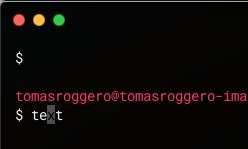
Even though the hyper.js config has accent set to white, when the window is focused, the text color seems black (so cursorAccentColor is never used??) making it very hard to read.
I have tried debugging and see if I could re-write the CSS for :focus but having a canvas renderer (or webgl for that matter) didn't help much.
Contributor guide
No contributing guide indexed for this repository
First steps
- Read the whole issue, then the project's contributing guide.
- Comment on the issue to say you are picking it up — it saves two people doing the same work.
- Fork the repository and make your change on a branch.
- Open a pull request that references the issue number.
Research direction
Start with the linked .hyper.js configuration and reproduce the focused block-cursor behavior in Hyper.app 3.0.2 on macOS Mojave. Inspect how the canvas or WebGL renderer applies the accent and cursor colors, then verify that focused block-cursor text remains readable when the accent is white.
Written by the indexing model from the issue text.
Assessment
- Tech stack
- css
- Domain
- desktop, frontend
- Issue type
- Bug
- Difficulty
- 3/5
- Estimated time
- 1-2 days
- Activity status
- Stale
- Clarity
- Mostly clear
- Newbie friendliness
- 35/100