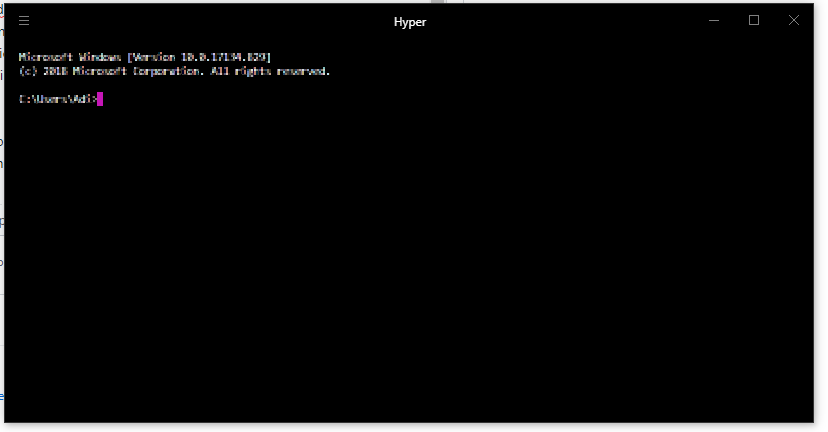
Vanilla Hyper is blurred,no matter what.Tried reinstalling,did not work.
Open
Nobody has claimed this yet.
- Dominant language
- TypeScript
- Stars
- 44.7k
- Forks
- 3.6k
- PR merge metrics
- No merged PRs in 30d
Description
- I am on the latest Hyper.app version
- I have searched the issues of this repo and believe that this is not a duplicate
- OS version and name: <Windows 10 17134>
- Hyper.app version: <3.02 stable->
- Link of a Gist with the contents of your .hyper.js: https://gist.github.com/AndreiIonica/3597fcbf06010f3fef9a476af8ffc327
- Relevant information from devtools (CMD+ALT+I on macOS, CTRL+SHIFT+I elsewhere):
- The issue is reproducible in vanilla Hyper.app:
Issue
Hyper text is blurred everywhere,using vanilla hyper:no themes, plugins, fresh install
Contributor guide
No contributing guide indexed for this repository
First steps
- Read the whole issue, then the project's contributing guide.
- Comment on the issue to say you are picking it up — it saves two people doing the same work.
- Fork the repository and make your change on a branch.
- Open a pull request that references the issue number.
Research direction
Reproduce the blur on Windows 10 17134 with Hyper 3.0.2 using the vanilla setup and the linked .hyper.js gist. Start by checking the reported behavior in Hyper's devtools, then identify the relevant rendering path; done means terminal text is sharp in a fresh installation.
Written by the indexing model from the issue text.
Assessment
- Tech stack
- typescript
- Domain
- cli, desktop
- Issue type
- Bug
- Difficulty
- 4/5
- Estimated time
- 3-5 days
- Activity status
- Stale
- Clarity
- Needs clarification
- Newbie friendliness
- 25/100