Shell/program incorrect detection
Nobody has claimed this yet.
- Dominant language
- TypeScript
- Stars
- 44.7k
- Forks
- 3.6k
- Avg merge
- 21m
- Merged PRs (30d)
- 1
Description
The window toolbar should show the currently used shell (command-line interpreter) used. It fails to display it currently. At first it writes Hyper when it is in the default cmd then when running bash it shows "bash" but when initialization completes it displays the current prompt text.
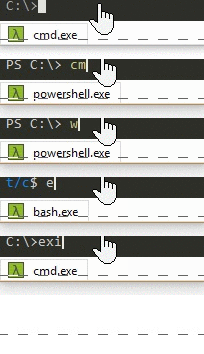
I think the behavior should be consistent displaying the current shell is the most useful. Just like cmder does in the bottom toolbar.
The correct behavior in cmder:
Contributor guide
No contributing guide indexed for this repository
First steps
- Read the whole issue, then the project's contributing guide.
- Comment on the issue to say you are picking it up — it saves two people doing the same work.
- Fork the repository and make your change on a branch.
- Open a pull request that references the issue number.
Research direction
Reproduce the toolbar behavior using the default cmd and then bash, noting the displayed text before and after initialization. Trace where the window toolbar determines its label and make the displayed value consistently identify the currently used shell rather than Hyper or the current prompt text. Done means the toolbar matches the shell name throughout startup and use.
Written by the indexing model from the issue text.
Assessment
- Tech stack
- shell, typescript
- Domain
- desktop
- Issue type
- Bug
- Difficulty
- 3/5
- Estimated time
- 1-2 days
- Activity status
- Stale
- Clarity
- Mostly clear
- Newbie friendliness
- 38/100