Replacing a formula in a cell with a string / number value does not work
Open
Nobody has claimed this yet.
- Dominant language
- Java
- Stars
- 50
- Forks
- 53
- Avg merge
- 1d 21h
- Merged PRs (30d)
- 1
Description
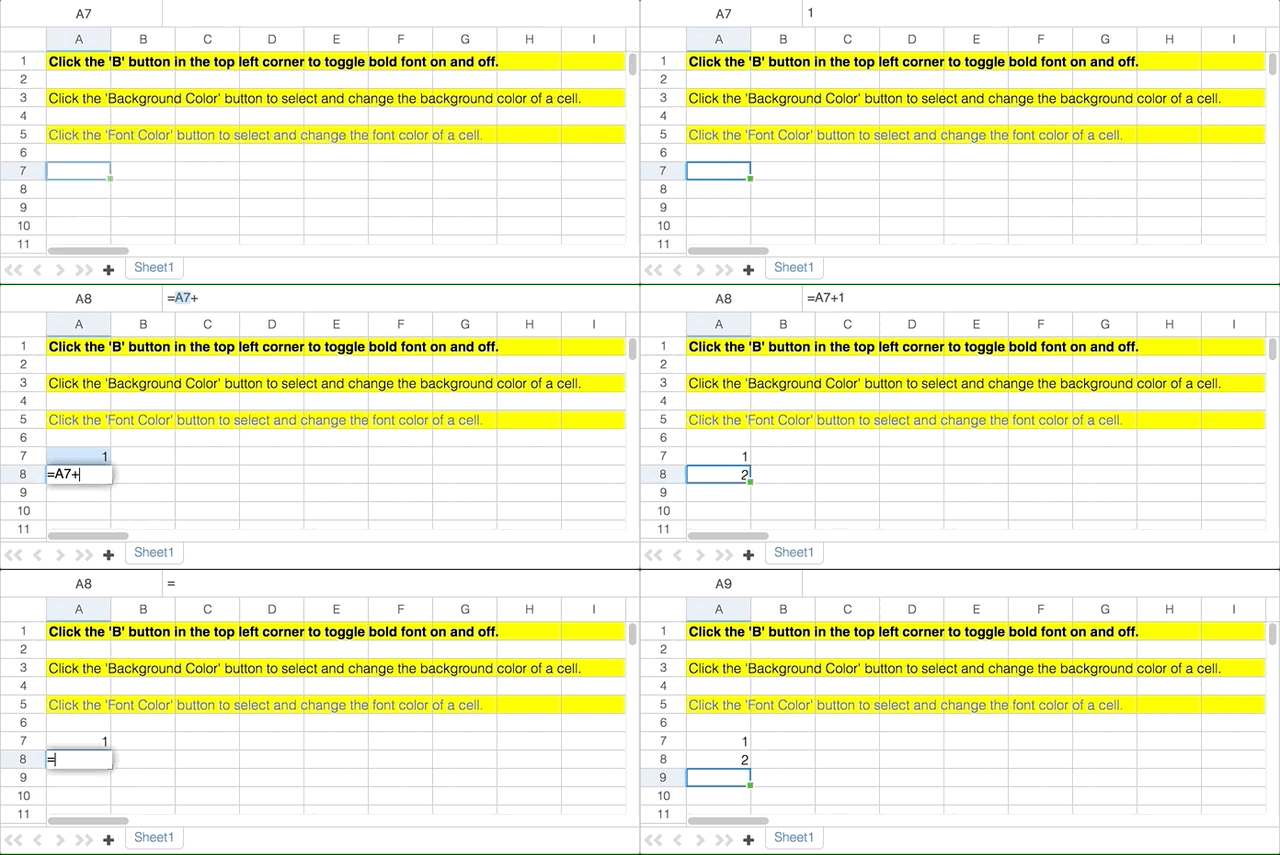
Steps to reproduce:
- open the spreadsheet demo page at https://demo.vaadin.com/spreadsheet/
- type a formula into a cell (e.g.
=A1+1) - double click / press F2 on the cell with the formula
- replace the formula with a string or a number
- press enter to finish editing the cell
- see that the cell is not updated (still have the formula)
Contributor guide
No contributing guide indexed for this repository
First steps
- Read the whole issue, then the project's contributing guide.
- Comment on the issue to say you are picking it up — it saves two people doing the same work.
- Fork the repository and make your change on a branch.
- Open a pull request that references the issue number.
Research direction
Start by reproducing the issue on the spreadsheet demo page at https://demo.vaadin.com/spreadsheet/ with a formula, then replace it with a string or number while editing. The fix is complete when pressing Enter updates the cell to the replacement value instead of retaining the formula.
Written by the indexing model from the issue text.
Assessment
- Tech stack
- java
- Domain
- frontend
- Issue type
- Bug
- Difficulty
- 3/5
- Estimated time
- 1-2 days
- Activity status
- Stale
- Clarity
- Mostly clear
- Newbie friendliness
- 45/100