[Grid] horizontal scrollbar doesn't change its state when a component within a column is focused programmatically
Open
Nobody has claimed this yet.
duplicate
Stale
- Dominant language
- Java
- Stars
- 1.8k
- Forks
- 717
- Avg merge
- 2d 6h
- Merged PRs (30d)
- 3
Description
Environment
- Vaadin Framework version: 8.9.1
- Browser version: Safari 13.0.2 (15608.2.30.1.1), Chrome 77.0.3865.120 (Official Build) (64-bit)
Description of the bug
The horizontal scrollbar doesn't change its state when a component within a column is focused programmatically as the result frozen columns disappear.
- Minimal reproducible example
Complete code listing - MyUI.txt
...

@Theme("mytheme")
public class MyUI extends UI {

    @Override
    protected void init(VaadinRequest vaadinRequest) {
        final VerticalLayout layout = new VerticalLayout();

        final Grid<Info> grid = new Grid<>();
        grid.setWidth("600px");
        grid.setHeight("200px");

        List<Info> infos = Arrays.asList(
                new Info("field11", "field12", "field13",
                        "field14", "field15", "field16",
                        "field17", "field18", "field19",
                        "field110", new TextField()),
                new Info("field21", "field22", "field23",
                        "field24", "field25", "field26",
                        "field27", "field28", "field29",
                        "field210", new TextField())
        );

        grid.setItems(infos);

        // Add columns
        // ...
        grid.addColumn(Info::getComponent)
                .setRenderer(new ComponentRenderer());

        grid.setFrozenColumnCount(2);

        Button button = new Button("Click Me");
        button.addClickListener(e ->
                infos.get(0).getComponent().focus()
        );

        layout.addComponents(grid, button);

        setContent(layout);
    }

    public class Info {
        ...
        private TextField component;

        ...

        public void setComponent(TextField component) {
            this.component = component;
        }
    }
...
}
- Run the app
- Click the button
- Expected behavior
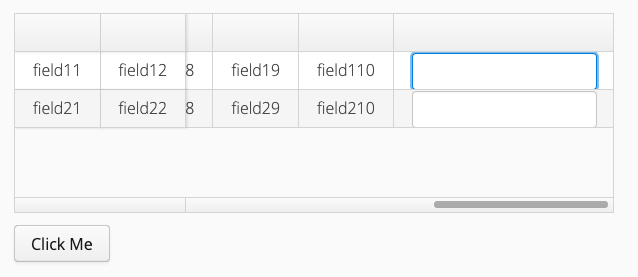
- Actual behavior
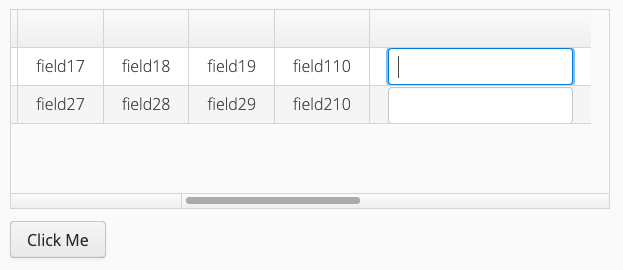
Contributor guide
First steps
- Read the whole issue, then the project's contributing guide.
- Comment on the issue to say you are picking it up — it saves two people doing the same work.
- Fork the repository and make your change on a branch.
- Open a pull request that references the issue number.
Research direction
Start with the complete reproducible example in MyUI.txt and run it with Vaadin Framework 8.9.1 in Safari or Chrome. Focus on Grid behavior when a component in a column is focused programmatically after two columns are frozen. Done means clicking the button updates the horizontal scrollbar state as the frozen columns disappear, matching the expected screenshot.
Written by the indexing model from the issue text.
Assessment
- Tech stack
- java
- Domain
- frontend
- Issue type
- Bug
- Difficulty
- 3/5
- Estimated time
- 1-2 days
- Activity status
- Stale
- Clarity
- Mostly clear
- Newbie friendliness
- 38/100