Force CPU Speed
- Dominant language
- Swift
- Stars
- 35.5k
- Forks
- 1.8k
- Avg merge
- 5d 5h
- Merged PRs (30d)
- 7
Description
**BEFORE SUBMITTING YOUR ISSUE, PLEASE LOOK AT THE PINNED ISSUES AND USE THE SEARCH FUNCTION TO MAKE SURE IT IS NOT ALREADY REPORTED. ALWAYS COMMENT ON AN EXISTING ISSUE INSTEAD OF MAKING A NEW ONE.**
**Describe the issue**
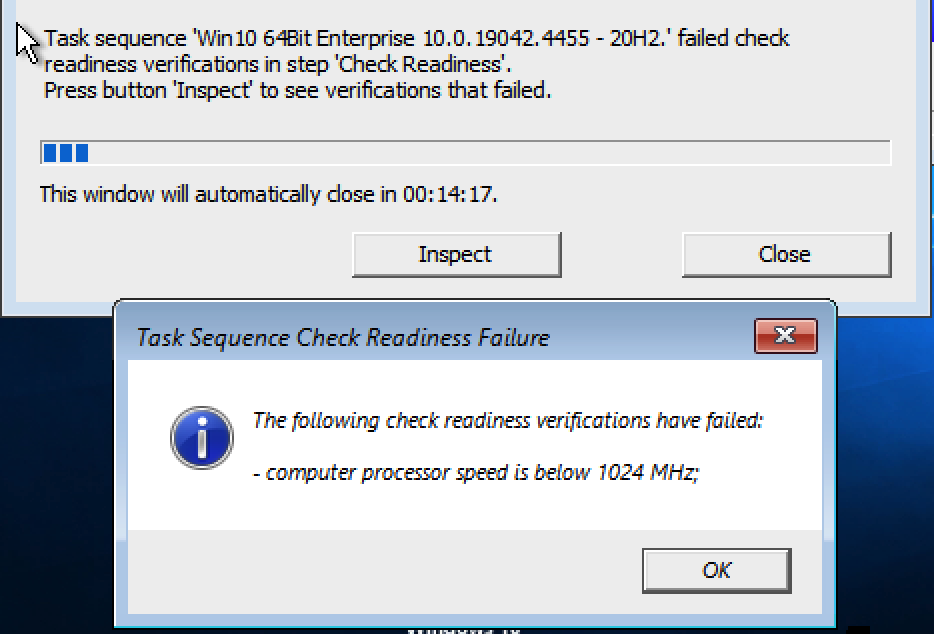
When trying to install Windows 10 (x86) on UTM (MacBook Pro 16" 2023 M2), the image we are using is checking for CPU Speed and seeing less than 1024 GHZ. How do we fool the Windows image to see more than 1024GHz so it will pass its check? I have tried a bunch of different System Types and CPU Types in UTM, but nothing will get the OS to pass the CPU Speed check. I see there are Flag that can be set, but the documentation is not too clear on which flags I need to set.
**Configuration**
* UTM Version: 4.1.6 (75)
* macOS Version: Ventura 13.2.1
* Mac Chip (Intel, M1, ...): M2
Contributor guide
Assessment
This issue has not been assessed yet.