One VM is appearing in the UTM list of VM's Twice
- Dominant language
- Swift
- Stars
- 35.5k
- Forks
- 1.8k
- Avg merge
- 5d 5h
- Merged PRs (30d)
- 7
Description
**Describe the issue**
Somehow, one of my VM entries appears in the UTM UI twice. You can see it's the same exact VM in both entries. If I start it, do some stuff, and stop it, the disk size confirms it's literally the same VM being displayed twice in the UI.
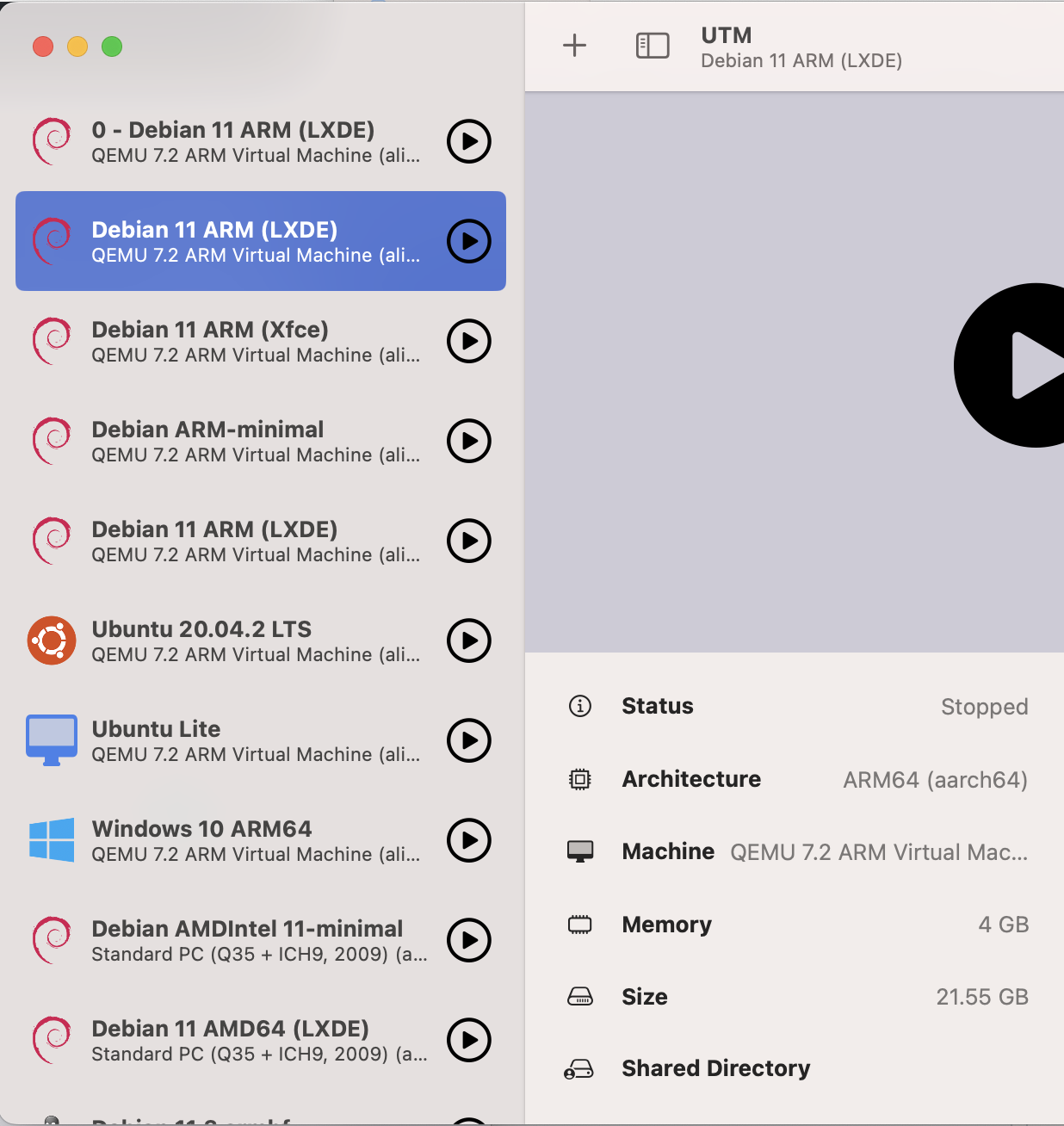
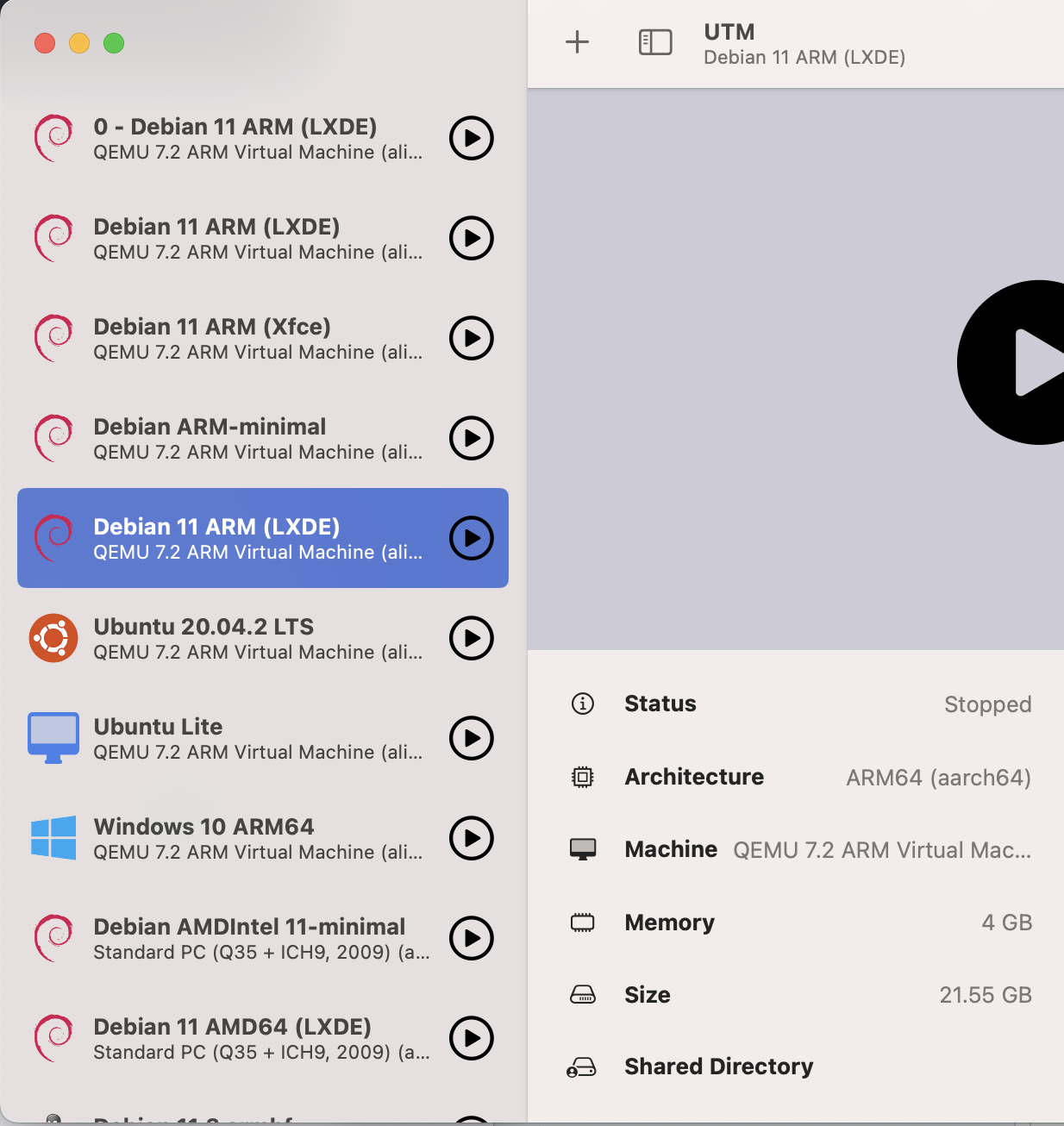
Even with the new `utmctl list` command, we can see there are two entries:
```
$ utmctl list
UUID Status Name
0AB6E630-909E-4760-A7FA-421A86431035 stopped 0 - Debian 11 ARM (LXDE)
**FC36A8F2-D3AD-4D46-B2BC-3141451E3A51 stopped Debian 11 ARM (LXDE)**
E071033B-6CD3-426B-9B75-A645CA22A484 stopped Debian 11 ARM (Xfce)
AE62014D-3D0E-4E5D-81BF-3D12AF8F987E stopped Debian ARM-minimal
**8169C503-2646-4317-BE65-7F931B70884F stopped Debian 11 ARM (LXDE)**
22A49A48-2E11-4CD0-BD57-44F92373D8C8 stopped Ubuntu 20.04.2 LTS
9A6AD999-B870-4C20-B63D-5F678D4A3C1C stopped Ubuntu Lite
D481DF90-A7E0-4289-BA3B-1344F89DAC65 stopped Windows 10 ARM64
A916AAFF-7AE7-4518-BCB3-51990C725657 stopped Debian AMDIntel 11-minimal
90613BCA-1429-495F-99FE-62EDFA71AB2F stopped Debian 11 AMD64 (LXDE)
3B55FA09-EE3B-460B-803F-58160D952AFC stopped Debian 11.3 armhf
558A5846-FD91-478C-BA44-0D5D3D9A7B88 stopped Kali Linux 2022.2
```
But when we look in the folder where the VM's are kept, we see that there is only one VM. It's not duplicated, just the config entry for it appears to be duplicated.
```
$ l
total 0
drwxr-xr-x@ 3 james staff 96 Jul 12 2021 Public
drwxr-xr-x@ 4 james staff 128 Oct 26 07:09 0 - Debian 11 ARM (LXDE).utm
drwxr-xr-x@ 4 james staff 128 Oct 26 07:09 Ubuntu 20.04.2 LTS.utm
drwxr-xr-x@ 4 james staff 128 Oct 26 07:09 Windows 10 ARM64.utm
drwxr-xr-x@ 4 james staff 128 Oct 26 07:09 Debian 11 ARM (Xfce).utm
drwxr-xr-x@ 4 james staff 128 Oct 26 07:09 Debian AMDIntel 11-minimal.utm
drwxr-xr-x@ 4 james staff 128 Oct 26 07:09 Debian 11 AMD64 (LXDE).utm
drwxr-xr-x@ 4 james staff 128 Oct 26 07:09 Debian 11.3 armhf.utm
drwxr-xr-x@ 5 james staff 160 Oct 26 07:09 Kali Linux 2022.2.utm
drwxr-xr-x@ 4 james staff 128 Oct 28 00:51 Debian ARM-minimal.utm
drwxr-xr-x@ 6 james staff 192 Dec 13 20:48 Ubuntu Lite.utm
**drwxr-xr-x@ 4 james staff 128 Jan 1 11:54 Debian 11 ARM (LXDE).utm**
```
Upon more investigation, I can see that the config.plist file shows the UUID of the VM as "8169C503-2646-4317-BE65-7F931B70884F" but then what's more confusing is two other VM's have that same ID, but it's under SystemUUID instead of UUID.
**Debian 11 ARM (LXDE).utm/config.plist**:
```
Information
Icon
debian
IconCustom
Name
Debian 11 ARM (LXDE)
Notes
*****
UUID
8169C503-2646-4317-BE65-7F931B70884F
```
But for two other VM's, this value is in the SystemUUID field, which doesn't exist in the other config file:
**Debian 11 ARM (Xfce).utm/config.plist**:
```
System
Architecture
aarch64
BootDevice
BootUefi
CPU
cortex-a72
CPUCount
0
ForceMulticore
JITCacheSize
0
MachineProperties
highmem=off
Memory
1024
SystemUUID
8169C503-2646-4317-BE65-7F931B70884F
Target
virt
```
**0 - Debian 11 ARM (LXDE).utm/config.plist**:
```
System
Architecture
aarch64
BootDevice
BootUefi
CPU
cortex-a72
CPUCount
0
ForceMulticore
JITCacheSize
0
MachineProperties
highmem=off
Memory
1024
SystemUUID
8169C503-2646-4317-BE65-7F931B70884F
Target
virt
```
As you can see, the Debian 11 ARM (LXDE) VM has an Information -> UUID key, while the other two VM's have a System -> SystemUUID key. Perhaps this is because of how old the VM's are? (They were all created back on v2 of UTM).
What's interesting is that the other two VM's seem to have separate configuration and don't
**Configuration**
* UTM Version: The issue appeared on 4.0.9 and persists in 4.1.5
* macOS Version: 13.0.1
* Mac Chip (Intel, M1, ...): M1
So far there's no side effects on the VM's, but I'm concerned there could be in the future and want to know how I could remove the duplicate entry in the least disruptive manner possible. Thank you!
Contributor guide
Assessment
This issue has not been assessed yet.