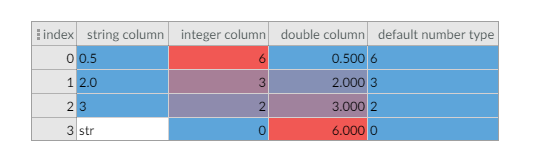
The table highlighting doesn't work for `string` and `number` types
- Dominant language
- Jupyter Notebook
- Stars
- 2.9k
- Forks
- 383
- PR merge metrics
- No merged PRs in 30d
Description
The default type for digits are defined as `number` type. But for `number` and `string` types the highlighting doesn't work.
Try this code on groovy:
```
def colNames = ["string column", "integer column", "double column", "default number type"]
def row1 = ["0.5", 6, 0.5, 6]
def row2 = ["2.0", 3, 2.0, 3]
def row3 = ["3", 2, 3.0, 2]
def row4 = ["str", 0, 6.0, 0]
table2 = new TableDisplay([row1, row2, row3, row4], colNames, ['string', 'integer', 'double'])
table2.addCellHighlighter(TableDisplayCellHighlighter.getHeatmapHighlighter("integer column", TableDisplayCellHighlighter.SINGLE_COLUMN))
table2.addCellHighlighter(TableDisplayCellHighlighter.getHeatmapHighlighter("string column", TableDisplayCellHighlighter.SINGLE_COLUMN))
table2.addCellHighlighter(TableDisplayCellHighlighter.getHeatmapHighlighter("double column", TableDisplayCellHighlighter.SINGLE_COLUMN))
table2.addCellHighlighter(TableDisplayCellHighlighter.getHeatmapHighlighter("default number type", TableDisplayCellHighlighter.SINGLE_COLUMN))
table2
```
the result is:
Contributor guide
No contributing guide indexed for this repository
Assessment
This issue has not been assessed yet.