tiny-pilot / tiny-pilot/tinypilot
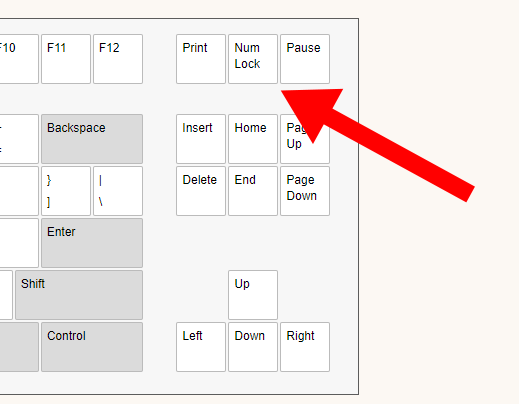
Add NumLock to on-screen keyboard
Nobody has claimed this yet.
- Dominant language
- Python
- Stars
- 3.5k
- Forks
- 291
- PR merge metrics
- No merged PRs in 30d
Description
The TinyPilot on-screen keyboard has no NumLock. This can lead to a case where the NumLock on the user's keyboard is out of state with the remote system:
https://forum.tinypilotkvm.com/-172/numlock-and-ten-key-numbers-issue
Workaround
In the meantime, the user can work around this by pasting the following snippet in their browser's JavaScript console:
let key = document.getElementById("on-screen-keyboard").shadowRoot.querySelector('keyboard-key[code="ScrollLock"]');
key.innerText = "Num Lock"
key.code = "NumLock"
This temporarily converts the Scroll Lock key on the on-screen keyboard to a Num Lock key.
Contributor guide
First steps
- Read the whole issue, then the project's contributing guide.
- Comment on the issue to say you are picking it up — it saves two people doing the same work.
- Fork the repository and make your change on a branch.
- Open a pull request that references the issue number.
Research direction
Start by locating the on-screen keyboard implementation for the on-screen-keyboard element and inspect how the workaround changes the ScrollLock key. Done means the keyboard visibly provides Num Lock and sends NumLock to the remote system; verify this against the existing keyboard behavior and any related tests.
Written by the indexing model from the issue text.
Assessment
- Tech stack
- javascript
- Domain
- frontend
- Issue type
- Feature
- Difficulty
- 3/5
- Estimated time
- 1-2 days
- Activity status
- Stale
- Clarity
- Mostly clear
- Newbie friendliness
- 45/100