Tilt WebUI keeps flickering and scrolling to the top of the resource log history
Nobody has claimed this yet.
Assessment
- Difficulty
- 4/5
- Estimated time
- 3-5 days
- Newbie friendliness
- 48/100
Research direction
Reproduce the issue with a Tiltfile using docker_build and docker_compose or kustomize, then run tilt up and inspect the resource log in Chrome. Use the Chrome performance profiler while waiting with no new logs; done means the panel no longer flickers and the scroll position stays where the user left it.
Written by the indexing model from the issue text.
Description
Expected Behavior
When nothing is changing in the resource and no new logs are generated, Tilt should not visually flicker or move the scroll position in the resource log window.
Current Behavior
Every ~1sec, the entire resource log panel flickers and snaps the scroll position to the top of the window or the bottom of the window.
Steps to Reproduce
I am not sure how easy this will be for others, but here is what I have
- Create a tiltfile that includes a
docker_buildand uses docker_compose or kustomize to deploy resources (not sure if this is relevant). tilt up- Go to the list-view of resources and scroll to the middle of a resource log.
- Wait a few seconds and watch the scroll bar snap to the top of the log history.
Context
tilt doctor Output
Tilt: v0.32.0, built 2023-03-13
System: linux-amd64
---
Docker
- Host: unix:///var/run/docker.sock
- Server Version: 20.10.23+azure-2
- API Version: 1.41
- Builder: 2
- Compose Version: v2.16.0 (build azure-2)
---
Kubernetes
- Env: kind
- Context: kind-kerfed
- Cluster Name: kind-kerfed
- Namespace: default
- Container Runtime: containerd
- Version: v1.25.2
- Cluster Local Registry: &RegistryHosting{Host:localhost:5863,HostFromClusterNetwork:kerfed-registry:5000,HostFromContainerRuntime:,Help:https://github.com/tilt-dev/ctlptl,SingleName:,}
---
Thanks for seeing the Tilt Doctor!
Please send the info above when filing bug reports. 💗

The info below helps us understand how you're using Tilt so we can improve,
but is not required to ask for help.
---
Analytics Settings
--> (These results reflect your personal opt in/out status and may be overridden by an `analytics_settings` call in your Tiltfile)
- User Mode: default
- Machine: anon
- Repo: 1kUo2fc12eYQzafhxY0yhw==
I am viewing the WebUI in Chrome for Linux Version 112.0.5615.49 (Official Build) (64-bit).
There are no outputs or errors in the browser console window as this is occurring.
About Your Use Case
This is a major usability problem for me as I can't really view logs at all, and the constant flickering means I have to minimize the Tilt window because it causes me eye strain.
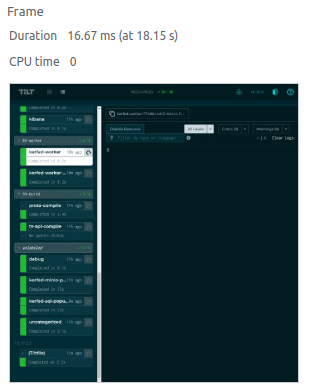
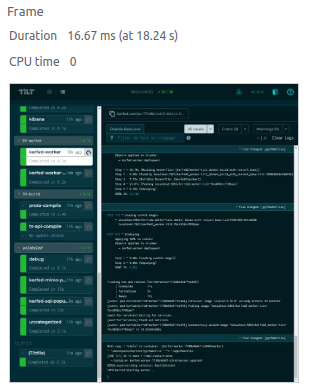
It looks like the underlying issue is that for a small number of frames, the logs are completely cleared and then refilled again, which I can see in the Chrome performance profiler:

- Dominant language
- Go
- Stars
- 10.1k
- Forks
- 413
- Avg merge
- 1d 10h
- Merged PRs (30d)
- 6
Contributor guide
First steps
- Read the whole issue, then the project's contributing guide.
- Comment on the issue to say you are picking it up — it saves two people doing the same work.
- Fork the repository and make your change on a branch.
- Open a pull request that references the issue number.
More from tilt-dev/tilt
-
Difficulty 3/5 1-2 days Newbie friendliness 30/100
-
Difficulty 4/5 3-5 days Newbie friendliness 35/100
-
enhancement
Difficulty 5/5 Over a week Newbie friendliness 45/100
-
enhancement
Difficulty 3/5 1-2 days Newbie friendliness 55/100
-
Tilt at scale Openenhancement
Difficulty 5/5 Over a week Newbie friendliness 25/100
Similar issues
-
optimization optimization:agents-md-curator
Difficulty 2/5 1-3 hours Newbie friendliness 86/100
githubnext/gh-aw-cao#13143 ·
-
Difficulty 2/5 1-3 hours Newbie friendliness 84/100
blinklabs-io/bursa#904 ·
-
Difficulty 2/5 1-3 hours Newbie friendliness 84/100
yanet-platform/ipfw-go#129 ·
-
bug confmap/provider/googlesecretmanagerprovider needs triage
Difficulty 2/5 1-3 hours Newbie friendliness 72/100
open-telemetry/opentelemetry-collector-contrib#51273 · 2 comments ·
-
bug: AI Gateway client filter lists "Unknown" twice when NULL and literal Unknown clients coexist Openbug
Difficulty 2/5 1-3 hours Newbie friendliness 90/100