thunderbird / thunderbird/thunderbird-android
Display unread count for account above folder list
Nobody has claimed this yet.
- Dominant language
- Kotlin
- Stars
- 14k
- Forks
- 2.8k
- Avg merge
- 3d 3h
- Merged PRs (30d)
- 57
Description
Checklist
- I have used the search function to see if someone else has already submitted the same feature request.
- I will describe the problem with as much detail as possible.
- This issue only contains a request for one single feature, not multiple (related) features.
App version
6.602
Problem you are trying to solve
I would like to see at a glance if I have unread emails in any folder for my account. Unread emails may be in folders that need scrolling down the folder list.
My options are
- scroll all the way down
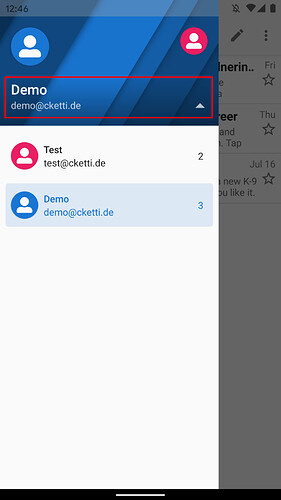
- fold the account in the drawer to see the unread count close to the account name (as shown in this forum thread)
Suggested solution
It would be nice if unread count was displayed close to the header element (in the red rectangle in picture above), so that it would also be visible when displaying the folder list for the account, that is when account is unfolded.
Notes:
-
When on a PC, I use either an email client or RoundCube webmail. Neither has the ability to display the total unread count AFAIK, but this is not really an issue because the screen is generally big enough to display all folders without scrolling. The difference here is the need to scroll down.
-
I noticed that total unread is displayed by the unread messages widget so this feature is less critical that I first thought. Especially for mono-account users. And multi-account users may want to see the unread count for all accounts at once anyway, so they may be fine with current situation (screenshot above).
Contributor guide
First steps
- Read the whole issue, then the project's contributing guide.
- Comment on the issue to say you are picking it up — it saves two people doing the same work.
- Fork the repository and make your change on a branch.
- Open a pull request that references the issue number.
Research direction
Start by locating the account header and folder-list UI, then compare it with the existing unread messages widget mentioned in the issue. The change is complete when the account's total unread count remains visible beside the account header while its folder list is expanded, including when folders require scrolling.
Written by the indexing model from the issue text.
Assessment
- Tech stack
- kotlin
- Domain
- mobile
- Issue type
- Feature
- Difficulty
- 3/5
- Estimated time
- 1-2 days
- Activity status
- Stale
- Clarity
- Mostly clear
- Newbie friendliness
- 45/100