thunderbird / thunderbird/thunderbird-android
Widget improvement to change between inboxes
Nobody has claimed this yet.
- Dominant language
- Kotlin
- Stars
- 14k
- Forks
- 2.8k
- Avg merge
- 3d 3h
- Merged PRs (30d)
- 57
Description
Checklist
- I have used the search function to see if someone else has already submitted the same feature request.
- I will describe the problem with as much detail as possible.
- This issue only contains a request for one single feature, not multiple (related) features.
App version
6.311
Problem you are trying to solve
The Wiget only shows the Unified Inbox instead of allowing a choice of which inbox should be displayed if multiple accounts are in use.
Suggested solution
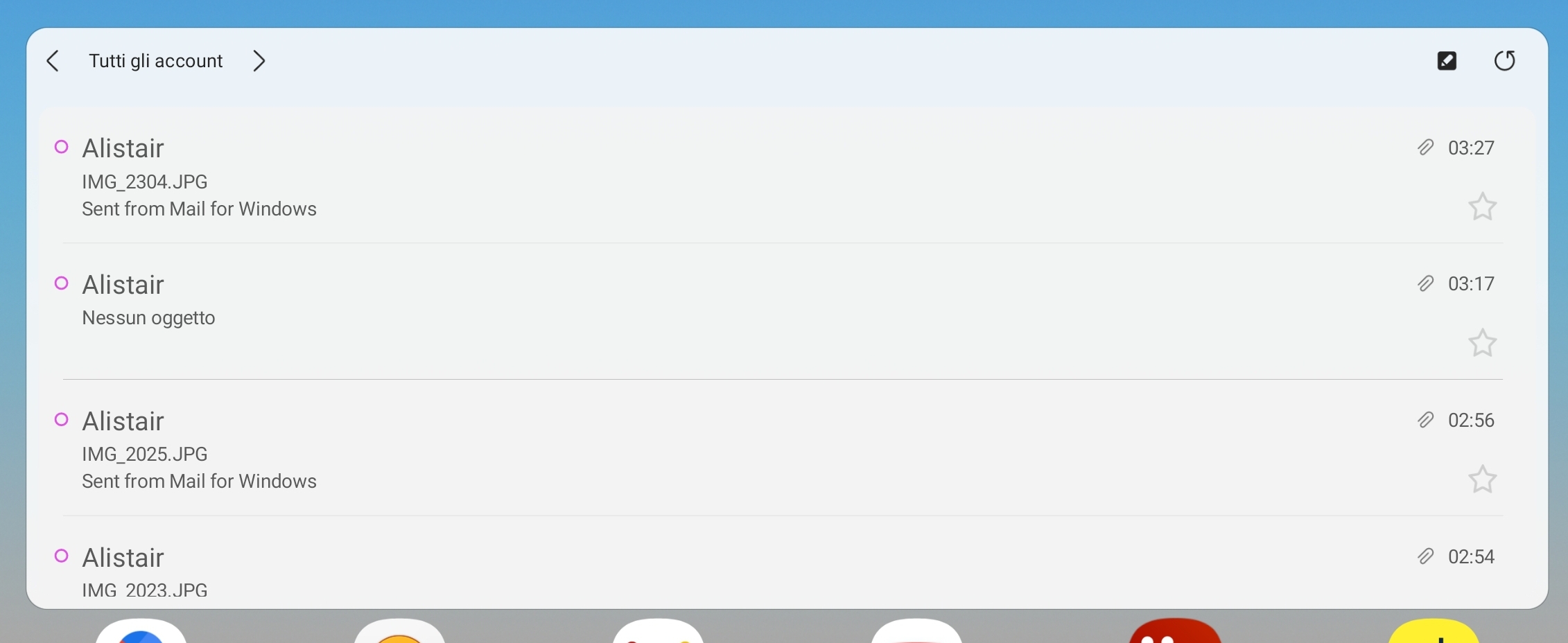
In the header bar of the widget allow account selection using <> in the following way:
, pressing < or > moves to next or previous account. Eg. , or back to
See the Samsung email widget for an example of how this would work.
Attached file is a screenshot of the Samsung widget.
Screenshots / Drawings / Technical details
Contributor guide
First steps
- Read the whole issue, then the project's contributing guide.
- Comment on the issue to say you are picking it up — it saves two people doing the same work.
- Fork the repository and make your change on a branch.
- Open a pull request that references the issue number.
Research direction
Locate the Android widget implementation and trace how it currently selects the Unified Inbox. Review the header controls and account-selection state, using the attached Samsung widget as the behavior reference. Done means the widget can cycle between the Unified Inbox and each configured account, with the selected inbox displayed correctly.
Written by the indexing model from the issue text.
Assessment
- Tech stack
- android, kotlin
- Domain
- mobile
- Issue type
- Feature
- Difficulty
- 4/5
- Estimated time
- 3-5 days
- Activity status
- Stale
- Clarity
- Mostly clear
- Newbie friendliness
- 42/100