thunderbird / thunderbird/thunderbird-android
some mails not shown on Android 11
Nobody has claimed this yet.
- Dominant language
- Kotlin
- Stars
- 14k
- Forks
- 2.8k
- Avg merge
- 3d 3h
- Merged PRs (30d)
- 57
Description
Describe the bug
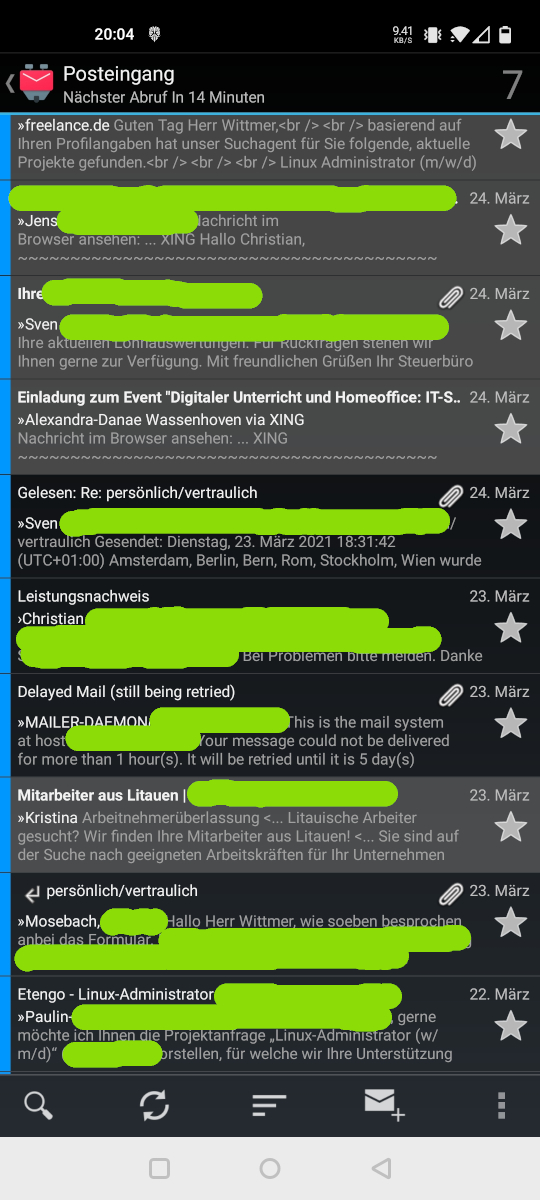
some existing mails are not shown on Android 11
- K-9 version: 5.600
- device: OnePlus 8
- Android version: 11
- Build: Oxygen OS 11.0.4.4.IN21BA
and are shown on Android 10
- K-9 version: 5.600
- device: OnePlus 6
- Android verson: 10
- Build: Oxygen OS 10.3.8
To Reproduce
- Install k-9 on both devices
- connect to your imap account based on dovecot IMAP (version: 2.3.11.3)
- compare mail list of INBOX on both devices
Expected behavior
both devices should show same mails
Screenshots
I marked 2 mails with a green cross that are shown up on the OP6 (Android 10) device and missing on OP8 (Android 11) device.

Environment (please complete the following information):
see description of BUG
Contributor guide
First steps
- Read the whole issue, then the project's contributing guide.
- Comment on the issue to say you are picking it up — it saves two people doing the same work.
- Fork the repository and make your change on a branch.
- Open a pull request that references the issue number.
Research direction
No source files, tests, or entry points are named. Start by reproducing the issue with K-9 5.600 on the listed Android 10 and Android 11 devices against the Dovecot IMAP account, then compare the INBOX message lists. Done means both devices display the same existing mails.
Written by the indexing model from the issue text.
Assessment
- Tech stack
- android, kotlin
- Domain
- mobile
- Issue type
- Bug
- Difficulty
- 4/5
- Estimated time
- 3-5 days
- Activity status
- Stale
- Clarity
- Needs clarification
- Newbie friendliness
- 25/100