thunderbird / thunderbird/thunderbird-android
Broken message aborts folder sync with NullPointerException
Nobody has claimed this yet.
- Dominant language
- Kotlin
- Stars
- 14k
- Forks
- 2.8k
- Avg merge
- 3d 3h
- Merged PRs (30d)
- 57
Description
Describe the bug
When refreshing the message list of an IMAP folder that contains a message broken(?) in some way, the folder refresh aborts at the broken message. No messages that have arrived to the mailbox after the broken message, including the broken message, are displayed. Other IMAP clients like Thunderbird and Roundcube show all messages in the folder.
To Reproduce
Steps to reproduce the behavior:
- Have a message that triggers the bug in a folder on IMAP server
- Refresh that folder in K9
- See the list of messages in that folder not contain messages after the broken message, including the broken message
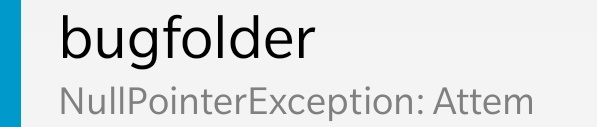
- Also see the exception displayed in the folder list
Expected behavior
No exceptions to be shown and folder message list in K9 to show all messages in the folder.
Screenshots
Attached is a screenshot of the folder exhibiting this issue, cropped from the folder list.
Environment (please complete the following information):
- K-9 Mail version: 5.600 (latest release from Google Play Store)
- Android version: 10 (OxygenOS 10.3.7)
- Device: OnePlus 6T (A6013)
- Account type: IMAP (Dovecot server)
Additional context
The triggering message is a malformed mime multipart/alternative spam email with text/plain and text/html parrts. Other mail clients do not seem to display what the spammer intended either, but they don't cause the folder to "freeze" to the point in time when the mail arrived, i.e. they show all other messages that arrived after the broken email.
Logs
Debug log starts from the point of refreshing the message list for "bugfolder", which only contains this one broken message to reduce clutter in the log. The bug also manifests itself in folders with more messages. Some identifying details of the server account and the email/address have been replaced.
k9nullp2-redacted.txt
Contributor guide
First steps
- Read the whole issue, then the project's contributing guide.
- Comment on the issue to say you are picking it up — it saves two people doing the same work.
- Fork the repository and make your change on a branch.
- Open a pull request that references the issue number.
Research direction
Start with the k9nullp2-redacted.txt log and the folder message-list refresh described in the report, using the malformed MIME message as the reproduction case. Trace where the refresh stops at the broken message; done means the folder shows that message and later messages without displaying an exception.
Written by the indexing model from the issue text.
Assessment
- Tech stack
- kotlin
- Domain
- backend, networking
- Issue type
- Bug
- Difficulty
- 4/5
- Estimated time
- 3-5 days
- Activity status
- Stale
- Clarity
- Mostly clear
- Newbie friendliness
- 45/100