thunderbird / thunderbird/thunderbird-android
k9mail for Tablets/Chromebooks: Enhance Tablet Mode
Nobody has claimed this yet.
- Dominant language
- Kotlin
- Stars
- 14k
- Forks
- 2.8k
- Avg merge
- 3d 3h
- Merged PRs (30d)
- 57
Description
Introduction
Love k9mail on my phone. Thought it would suck on my shiny new Pixebook because it's engineered for smaller displays, but it doesn't and I believe it is the best email app for my Pixelbook.
It does what it says on the box:
- Easy to setup and integrates well with contacts and file storage.
- No 3rd-party data collection.
- It is the only email app I have found that can delete emails with the Pixelbook's "backspace" key. The "refresh" and "back" keys also work (which is handy because some of the settings pages do not have a back button to touch)
- it also works in windowed "phone"/portrait mode although the window is quite small. Almost like a widget!

To make it even better Tablet/big-screen mode could be enhanced.
Expected behavior
Would be great to capitalise on extra screen real-estate/space on tablets and Chromebooks.
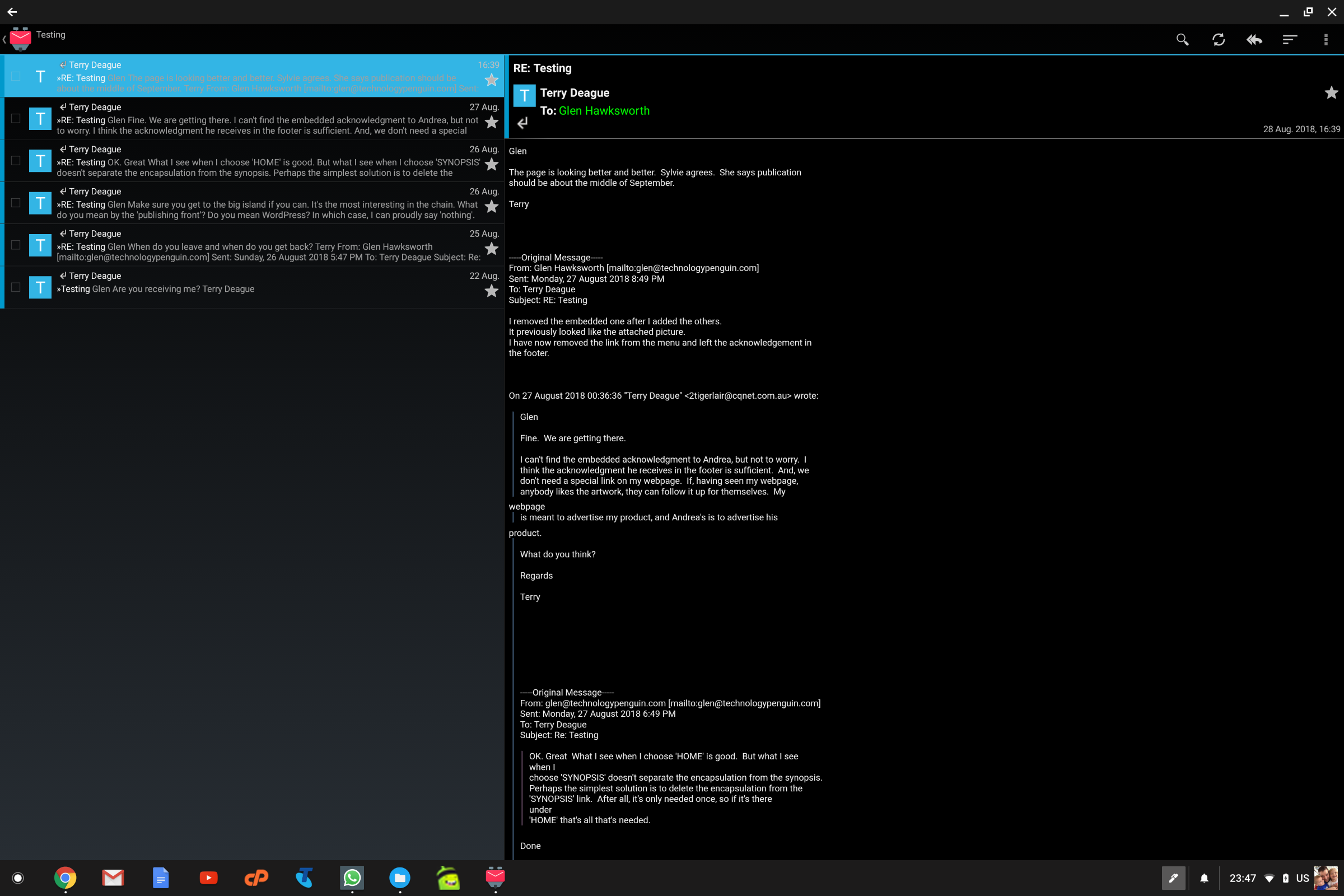
- allow 3 columns? Folders/Accounts, messages and preview (multi-column view for settings would also be handy)
- include icons for all tasks (notably: reply, reply all, forward)
- a "back" button or "close" button (X) for settings.
- WISHLIST: support split-screen (re-sizeable window). A larger portrait view would be handy for split-screen. eg. 3 columns in full-screen landscape mode, 2 columns in split-screen, 1 column in phone/widget mode.
To be honest, that would be enough!!
Actual behavior
- lots of wasted space and tedious going back and forth from folders to messages. Less of a problem with the Unified inbox
- have to click on the send icon and then select the action every time. Twice as many clicks as needed.
- Once you have selected one of the menus have to rely on the "back" button (<-) or "esc" on the keyboard. In tablet mode you need to swipe up from the bottom and use the little "back" arrow that appears bottom left.
- You can currently only use k9 in full-screen or mini-phone views.
Thanks
Thanks for your time. I appreciate all the effort you put into this app. I hope none of the above comes off as pure criticism, it is my intention for it to be wholly constructive. This is the first time I have been inspired to post a feature request on GitHub and it's because I think you have an excellent App.
I would even be prepared to pay for a tablet version of K9. It would make that much of an improvement to my Pixelbook.
Environment
K-9 Mail Version: 5.403
Android version: Android for Pixelbook
Contributor guide
First steps
- Read the whole issue, then the project's contributing guide.
- Comment on the issue to say you are picking it up — it saves two people doing the same work.
- Fork the repository and make your change on a branch.
- Open a pull request that references the issue number.
Research direction
No files, tests, or entry points are named. Start by locating the current tablet and Chromebook layouts, message-list navigation, settings navigation, and reply actions. Compare the existing behavior with the four requested areas, then define a scoped tablet-mode change and verify the resulting column layouts, actions, navigation controls, and split-screen behavior.
Written by the indexing model from the issue text.
Assessment
- Tech stack
- android, kotlin
- Domain
- frontend, mobile
- Issue type
- Feature
- Difficulty
- 5/5
- Estimated time
- Over a week
- Activity status
- Stale
- Clarity
- Mostly clear
- Newbie friendliness
- 25/100