texstudio-org / texstudio-org/texstudio
When changing reference command for Structure Panel, also change references to next/previous label.
Nobody has claimed this yet.
- Dominant language
- C++
- Stars
- 3.6k
- Forks
- 403
- Avg merge
- 3h 14m
- Merged PRs (30d)
- 12
Description
There is an option for the Structure Panel to change \ref to \autoref (or anything else).
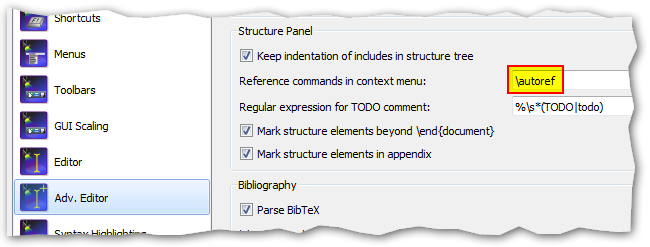
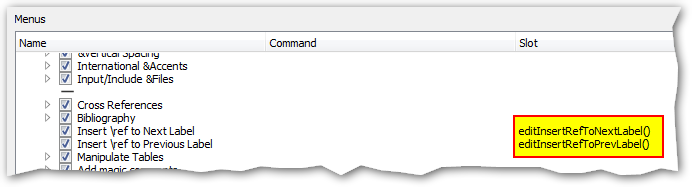
This could be rephrased and also affect the ability to add a reference to the next/previous label.

(I did not find a way to alter the menu entry itself so I think it has to be done programatically.)
Environment
- TeXstudio: 2.12.16 (git 2.12.16)
- Qt: 5.12.1
- OS: Windows 7 x64
- TeX distribution: doesn't matter
Expected behavior
When changing the settings for references in the structure view the references to next/previous label should be affected, too, and be \autoref.
Actual behavior
When changing the settings the references to next/previous label are still \refs.
How to reproduce
change the setting and hit CTRL+ALT+R
Contributor guide
No contributing guide indexed for this repository
First steps
- Read the whole issue, then the project's contributing guide.
- Comment on the issue to say you are picking it up — it saves two people doing the same work.
- Fork the repository and make your change on a branch.
- Open a pull request that references the issue number.
Research direction
Start with the Structure Panel reference setting and the CTRL+ALT+R next/previous-label command path. Trace how the configured reference command is applied and verify that changing it affects those references as well; done means the generated command uses the selected value instead of always using \ref.
Written by the indexing model from the issue text.
Assessment
- Tech stack
- cpp, latex
- Domain
- desktop
- Issue type
- Bug
- Difficulty
- 3/5
- Estimated time
- 1-2 days
- Activity status
- Stale
- Clarity
- Mostly clear
- Newbie friendliness
- 45/100