texstudio-org / texstudio-org/texstudio
Cut-off text display for large font sizes in syntax highlighting.
Open
Nobody has claimed this yet.
- Dominant language
- C++
- Stars
- 3.6k
- Forks
- 403
- Avg merge
- 3h 14m
- Merged PRs (30d)
- 12
Description
To reproduce
- Set "size" attribute of Syntax Highlighting > structure to 200%.
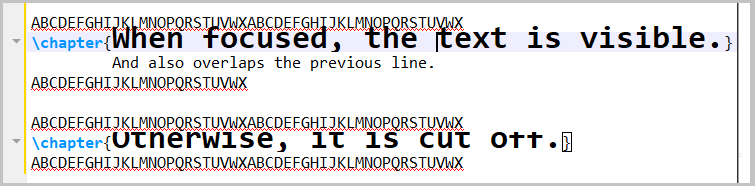
The issue is unaffected by Editor > Line Spacing; Even setting it to 300%, resulting in large white space between the lines, the text would be displayed cut-off.
Workaround
- Do not use higher sizes than 150%.
Environment
- TeXstudio: 2.12.10
- Qt: Using Qt Version 5.8.0, compiled with Qt 5.8.0 R
- OS: Windows 10 (Microsoft Windows [Version 10.0.17134.165])
- TeX distribution: MikTeX
Contributor guide
No contributing guide indexed for this repository
First steps
- Read the whole issue, then the project's contributing guide.
- Comment on the issue to say you are picking it up — it saves two people doing the same work.
- Fork the repository and make your change on a branch.
- Open a pull request that references the issue number.
Research direction
No source file or test is identified. First reproduce the issue in TeXstudio by setting Syntax Highlighting > structure to 200% and inspect the syntax-highlighting display path; done means highlighted text is no longer cut off at large sizes, including when line spacing is increased.
Written by the indexing model from the issue text.
Assessment
- Tech stack
- cpp
- Domain
- desktop
- Issue type
- Bug
- Difficulty
- 3/5
- Estimated time
- 1-2 days
- Activity status
- Stale
- Clarity
- Mostly clear
- Newbie friendliness
- 45/100