tensorflow / tensorflow/tensorboard
Time series dark mode colors are barely readable
Open
Nobody has claimed this yet.
plugin:time-series
theme:ui-polish
theme:usability
- Dominant language
- TypeScript
- Stars
- 7.2k
- Forks
- 1.7k
- Avg merge
- 4d 22h
- Merged PRs (30d)
- 1
Description
The colors used in the time series tab are barely readable with dark mode turned on.
Screenshot:
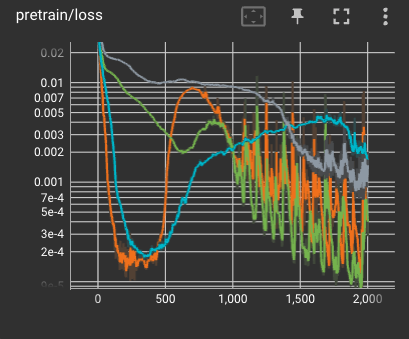
The main issues are, IMHO, the following:
- The grey color is too similar to the background color
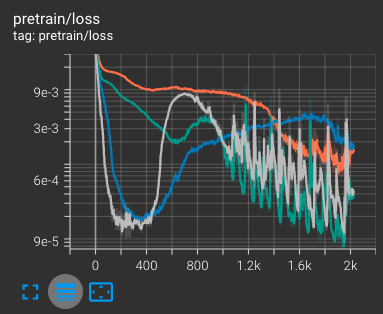
- The grid lines should be dark grey and not white, the white is a stark contrast lowering the perceived contrast of the remaining lines.
- The background color is too bright.
For comparison this is what the same plot looks like in the scalar tab:
Versions:
- TensorBoard 2.10.0
- Chrome: 104.0.5112.101
Contributor guide
First steps
- Read the whole issue, then the project's contributing guide.
- Comment on the issue to say you are picking it up — it saves two people doing the same work.
- Fork the repository and make your change on a branch.
- Open a pull request that references the issue number.
Research direction
Reproduce the time series tab in dark mode using TensorBoard 2.10.0 and Chrome 104, then compare its plot with the scalar tab shown in the screenshots. Trace the time series chart styling and adjust the grey series, grid lines, and background so they remain readable without the stark white contrast; done means the dark-mode plot has clearly visible lines and grid.
Written by the indexing model from the issue text.
Assessment
- Tech stack
- typescript
- Domain
- data-visualization, frontend
- Issue type
- Bug
- Difficulty
- 3/5
- Estimated time
- 1-2 days
- Activity status
- Stale
- Clarity
- Mostly clear
- Newbie friendliness
- 45/100