tensorflow / tensorflow/tensorboard
TensorBoard raises 403 when run in Colab in an incognito browser
Nobody has claimed this yet.
- Dominant language
- TypeScript
- Stars
- 7.2k
- Forks
- 1.7k
- Avg merge
- 4d 22h
- Merged PRs (30d)
- 1
Description
Setup:
- Open a new incognito browser
- Navigate to this standard TensorBoard demo colab notebook https://colab.research.google.com/github/tensorflow/tensorboard/blob/master/docs/tensorboard_in_notebooks.ipynb#
- Log into Google using a personal account in order to connect to Colab runtime
- Execute all the cells
I get a 403 error instead of an active TensorBoard view.
It appears that a request to ?tensorBoardColab=true fails due to a 403. Note that other requests that are not strictly to https://colab.research.google.com may pass. This may be due to a different Referrer Policy
View of network tab with 403 request
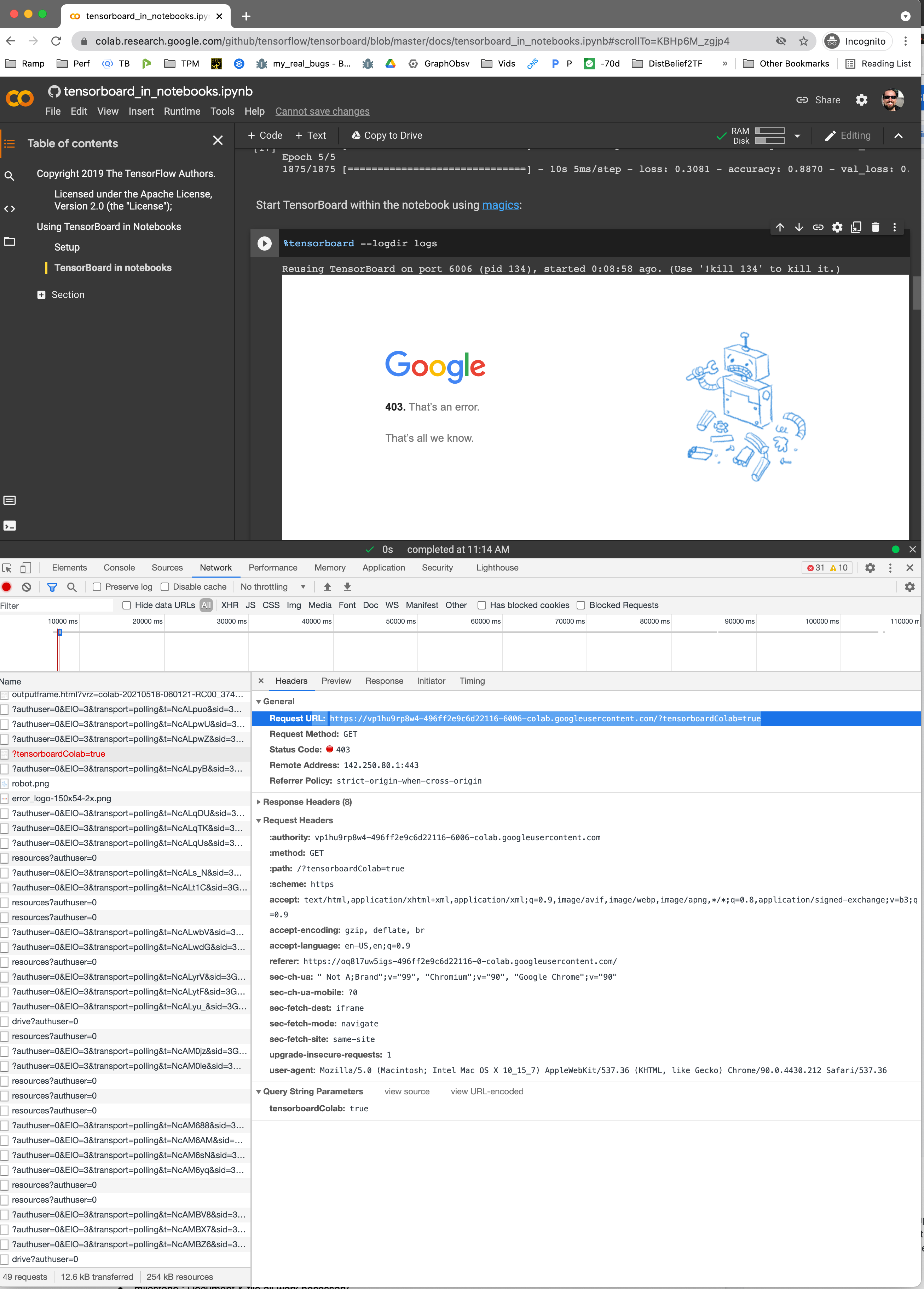
View of network tab with similar successful request

Contributor guide
First steps
- Read the whole issue, then the project's contributing guide.
- Comment on the issue to say you are picking it up — it saves two people doing the same work.
- Fork the repository and make your change on a branch.
- Open a pull request that references the issue number.
Research direction
Start by reproducing the failure in the linked tensorboard_in_notebooks.ipynb Colab notebook using an incognito browser and inspect the request containing ?tensorBoardColab=true. Compare its 403 response and Referrer Policy with the similar successful request shown in the issue; done means the notebook opens an active TensorBoard view without that 403.
Written by the indexing model from the issue text.
Assessment
- Tech stack
- typescript
- Domain
- frontend
- Issue type
- Bug
- Difficulty
- 4/5
- Estimated time
- 3-5 days
- Activity status
- Stale
- Clarity
- Needs clarification
- Newbie friendliness
- 25/100