tensorflow / tensorflow/tensorboard
blurry images in Chrome despite `image-rendering: pixelated`
Nobody has claimed this yet.
- Dominant language
- TypeScript
- Stars
- 7.2k
- Forks
- 1.7k
- Avg merge
- 4d 22h
- Merged PRs (30d)
- 1
Description
This tracks a bug that appears under recent versions of Chrome (at least, 85.0.4183.121 (Official Build) (64-bit) on macOS Version 10.15.4 (Build 19E287)). The bug manifests as transient blurriness in rendering upscaled images in the image dashboard that are deliberately meant to be pixelated; aka, the desired image-rendering: pixelated CSS property is not being upheld 100% of the time.
Steps to reproduce:
-
Write image summary data as follows. The known important parts are A) including 2 steps so that the step slider is shown and B) omitting a description (this is critical since if a description is included, an "info" icon will be rendered in the card header, and this seems to suppress the bug; note that the image demo includes descriptions for all tags so it can't be used to repro the bug).
import tensorflow as tf with tf.summary.create_file_writer("/tmp/blurry").as_default(): for step in range(2): tf.summary.image("test", tf.expand_dims(tf.eye(16, batch_shape=[1]), axis=-1), step=step) -
Launch TensorBoard at the resulting logdir
/tmp/blurry. The bug seems longstanding; I checked at least TensorBoard versions 1.15.0, 2.2.1, and current nightly (2.4.0a20200930). -
Open the images dashboard. The pixelated image summary should be shown.
-
Resize the browser window. This part is slightly finicky; the bug seems to repro most reliably if doing this using a grab handle on the window that is not adjacent to the viewport or address bar (e.g. use one of the top corners attached to the OS level window header, rather than the sides or bottom corners). Sometimes a resize doesn't trigger the bug (e.g. maybe for window widths that are too small), if so, just keep trying.
-
Mouse over the viewport or address bar. As soon as the cursor enters this region, the pixelated image should suddenly turn blurry.
-
Generally the image will remain blurry until it a repaint is triggered somehow (e.g. by toggling the actual size view, or sliding the step back and forth, by collapsing and re-opening the clickable "category pane", or by resizing the browser window again). Occasionally, it "snaps back" to being crisp before this though.
I failed to reproduce the bug in the following circumstances:
- If there's only a single step, and no step slider is shown.
- If the tag has a description, i.e. the "info" icon is shown in the card header.
- Using Firefox - it behaves correctly.
- Using Safari - in Safari, the image appears to always be blurry and I can't get it to unblur in the normal ways (e.g. by refreshing, by re-painting the image) except that when I start to scroll the image up out of the visible area of the page, it reverts to being pixelated for the part that remains uncovered by the TensorBoard header. This seems like a possibly related bug, but it's even more broken and we only provide best-effort support for Safari, so not tracking it as part of this fix.
My guess is that this is a rendering bug in Chrome. I found a couple reported issues which sound quite similar:
- CSS image-rendering: pixelated blurry and inconsistent behavior
- Image becomes Blurry and Quality Degrades Badly when Switching Tabs or Scrolling Down Futher through Tweets
I also notice that the situations in which the bug reproduces are the exact circumstances in which we seem to be also triggering a UI issue where an unwanted scrollbar appears below the image card:
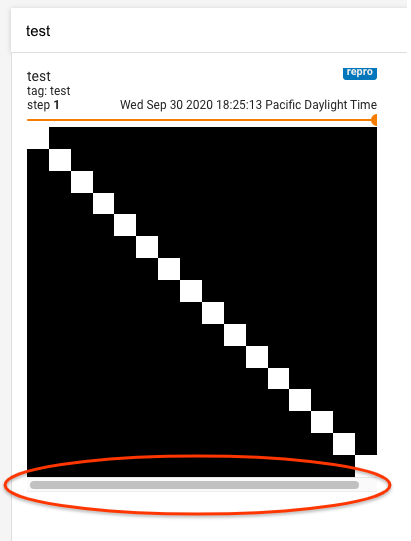
I.e. the scrollbar doesn't show up when there's either no step slider, or when there is a description "info" icon. This is also true in Firefox and Safari.
So it's possible that if we address whatever CSS or positioning issue it is that generates the unwanted scrollbar, that might eliminate whatever it is that leads to the Chrome misbehavior.
Contributor guide
First steps
- Read the whole issue, then the project's contributing guide.
- Comment on the issue to say you are picking it up — it saves two people doing the same work.
- Fork the repository and make your change on a branch.
- Open a pull request that references the issue number.
Research direction
Start by reproducing the issue in Chrome with the provided TensorFlow summary data, then inspect the image dashboard layout around the step slider, missing description, and unwanted scrollbar. Done means the upscaled image remains pixelated after resizing and hovering, with the related unwanted scrollbar addressed if it shares the cause.
Written by the indexing model from the issue text.
Assessment
- Tech stack
- css, typescript
- Domain
- frontend, web-dev
- Issue type
- Bug
- Difficulty
- 4/5
- Estimated time
- 3-5 days
- Activity status
- Stale
- Clarity
- Mostly clear
- Newbie friendliness
- 35/100