tensorflow / tensorflow/models
Evaluation Graphs on Tensorboard
Open
Nobody has claimed this yet.
models:research:odapi
type:support
- Dominant language
- Python
- Stars
- 77.7k
- Forks
- 44.8k
- PR merge metrics
- No merged PRs in 30d
Description
Hi,
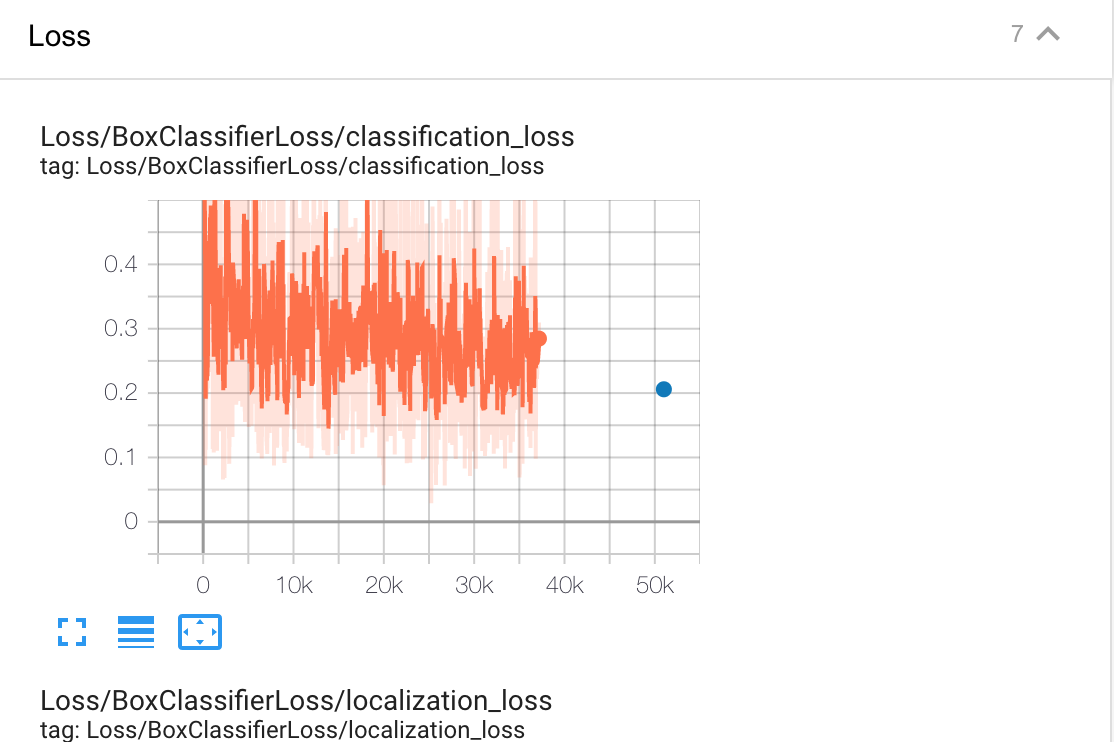
I am using GCP to run a faster rcnn model using the TF2 OD API. In tensorboard the evaluation losses are only at one point is there a way to see how the evaluation loss develops over the number of steps. Can be seen in the graph below of how the evaluation loss is only at 50k.
The pipeline config file is below:
model {
  faster_rcnn {
    num_classes: 10
    image_resizer {
      fixed_shape_resizer {
        height: 640
        width: 640
      }
    }
    feature_extractor {
      type: 'faster_rcnn_resnet101_keras'
      batch_norm_trainable: true
    }
    first_stage_anchor_generator {
      grid_anchor_generator {
        scales: [0.25, 0.5, 1.0, 2.0]
        aspect_ratios: [0.5, 1.0, 2.0]
        height_stride: 16
        width_stride: 16
      }
    }
    first_stage_box_predictor_conv_hyperparams {
      op: CONV
      regularizer {
        l2_regularizer {
          weight: 0.0
        }
      }
      initializer {
        truncated_normal_initializer {
          stddev: 0.01
        }
      }
    }
    first_stage_nms_score_threshold: 0.0
    first_stage_nms_iou_threshold: 0.7
    first_stage_max_proposals: 300
    first_stage_localization_loss_weight: 2.0
    first_stage_objectness_loss_weight: 1.0
    initial_crop_size: 14
    maxpool_kernel_size: 2
    maxpool_stride: 2
    second_stage_box_predictor {
      mask_rcnn_box_predictor {
        use_dropout: false
        dropout_keep_probability: 1.0
        fc_hyperparams {
          op: FC
          regularizer {
            l2_regularizer {
              weight: 0.0
            }
          }
          initializer {
            variance_scaling_initializer {
              factor: 1.0
              uniform: true
              mode: FAN_AVG
            }
          }
        }
        share_box_across_classes: true
      }
    }
    second_stage_post_processing {
      batch_non_max_suppression {
        score_threshold: 0.0
        iou_threshold: 0.6
        max_detections_per_class: 100
        max_total_detections: 300
      }
      score_converter: SOFTMAX
    }
    second_stage_localization_loss_weight: 2.0
    second_stage_classification_loss_weight: 1.0
    use_static_shapes: true
    use_matmul_crop_and_resize: true
    clip_anchors_to_image: true
    use_static_balanced_label_sampler: true
    use_matmul_gather_in_matcher: true
  }
}

train_config: {
  batch_size: 4
  sync_replicas: true
  startup_delay_steps: 0
  replicas_to_aggregate: 8
  num_steps: 200000
  optimizer {
    momentum_optimizer: {
      learning_rate: {
         manual_step_learning_rate {
          initial_learning_rate: 0.0001
          schedule {
            step: 100000
            learning_rate: .00001
          }
          schedule {
            step: 150000
            learning_rate: .000001
          }
        }
      }
      momentum_optimizer_value: 0.9
    }
    use_moving_average: false
  }
  gradient_clipping_by_norm: 10.0
  fine_tune_checkpoint_version: V2
  fine_tune_checkpoint: "gs://bdd_frcnn_original/data/ckpt-0"
  fine_tune_checkpoint_type: "detection"
  data_augmentation_options {
    random_horizontal_flip {
    }
  }

  max_number_of_boxes: 100
  unpad_groundtruth_tensors: false
  use_bfloat16: true  # works only on TPUs
}

train_input_reader: {
  label_map_path: "gs://bdd_frcnn_original/data/bdd_label_map.pbtxt"
  tf_record_input_reader {
    input_path: "gs://bdd_frcnn_original/data/train_new.tfrecord"
  }
}

eval_config: {
  num_visualizations: 20
  num_examples: 6990
  max_evals: 10
  metrics_set: "coco_detection_metrics"
  use_moving_averages: false
  batch_size: 1
}

eval_input_reader: {
  label_map_path: "gs://bdd_frcnn_original/data/bdd_label_map.pbtxt"
  shuffle: false
  num_epochs: 1
  tf_record_input_reader {
    input_path: "gs://bdd_frcnn_original/data/val_new.tfrecord"
  }
}
Thank you !
Contributor guide
First steps
- Read the whole issue, then the project's contributing guide.
- Comment on the issue to say you are picking it up — it saves two people doing the same work.
- Fork the repository and make your change on a branch.
- Open a pull request that references the issue number.
Assessment
This issue has not been assessed yet.