Provide clear visual indication when WFTScheduled get collapsed due to recurring WFTTimedOut
Nobody has claimed this yet.
- Dominant language
- TypeScript
- Stars
- 431
- Forks
- 179
- Avg merge
- 2d 9h
- Merged PRs (30d)
- 71
Description
Context
When a scheduled Workflow Task is repeatedly timing out (ie. a worker poll that WFT, but does not send a completion response within the allowed start-to-close timeout period), the server stops recording WFT Scheduled/Started/TimedOut events to history.
Instead, it collapses recurring attempts to a single WFT Scheduled event, that is kept in mutable state and get written to history only once the WFT eventually completes execution.
Server also progressively increase the start-to-close on that WFT Scheduled event, as a way to resolve cases where the Workflow Task Execution might failed because of the history’s size growing too heavy and other similar reasons.
Describe the problem
Users using the Temporal UI to examine a Workflow are often left puzzled with two questions related to WFT Scheduled/Started/TimedOut events collapsing:
- While the WFT Scheduled is still being retried due to recurring Time Outs, the most recent event displayed in history is the last recorded Timed Out event (ie. the last event before the server began collapsing events). User thus get the impression that the Workflow is stuck and not being actively retried, and believe that the Temporal server has somehow forgot to reschedule the WFT.
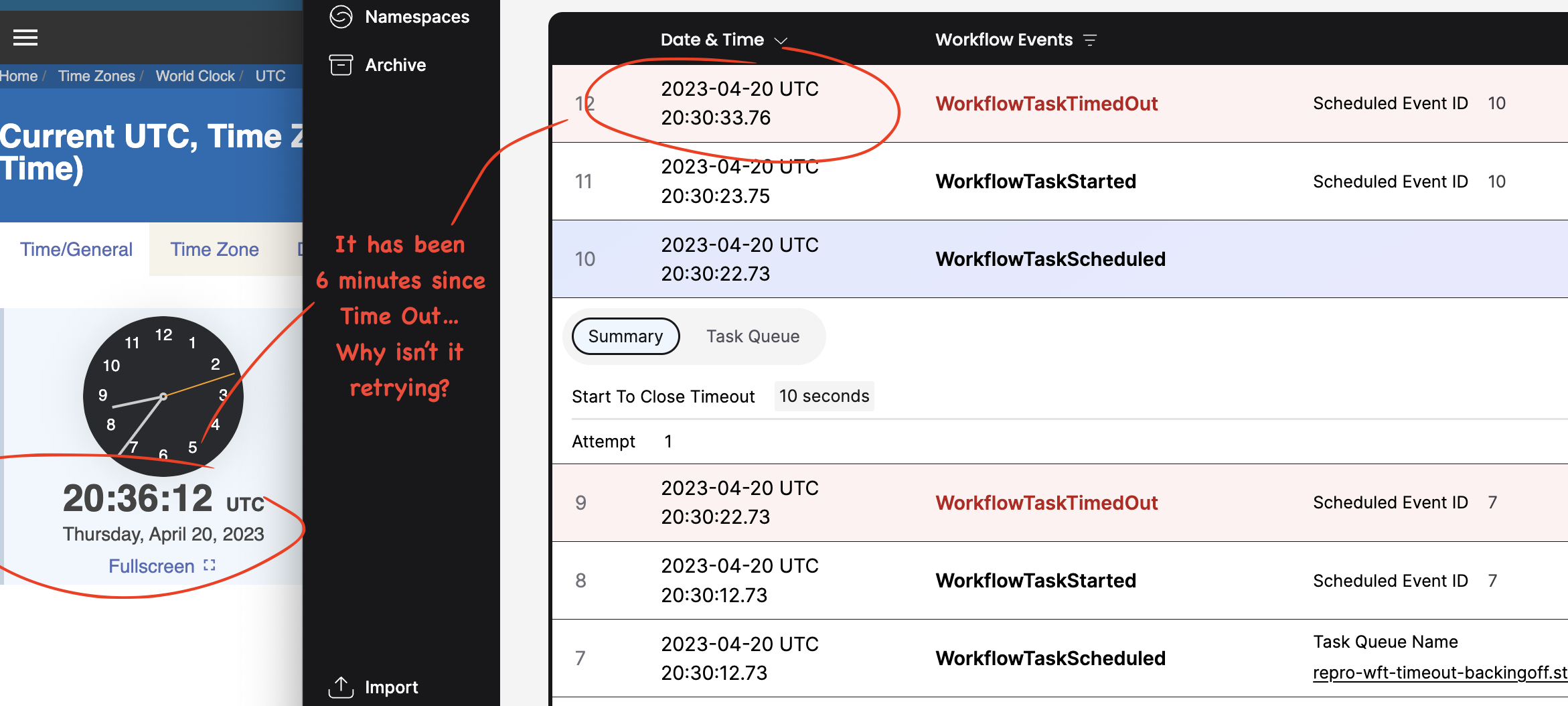
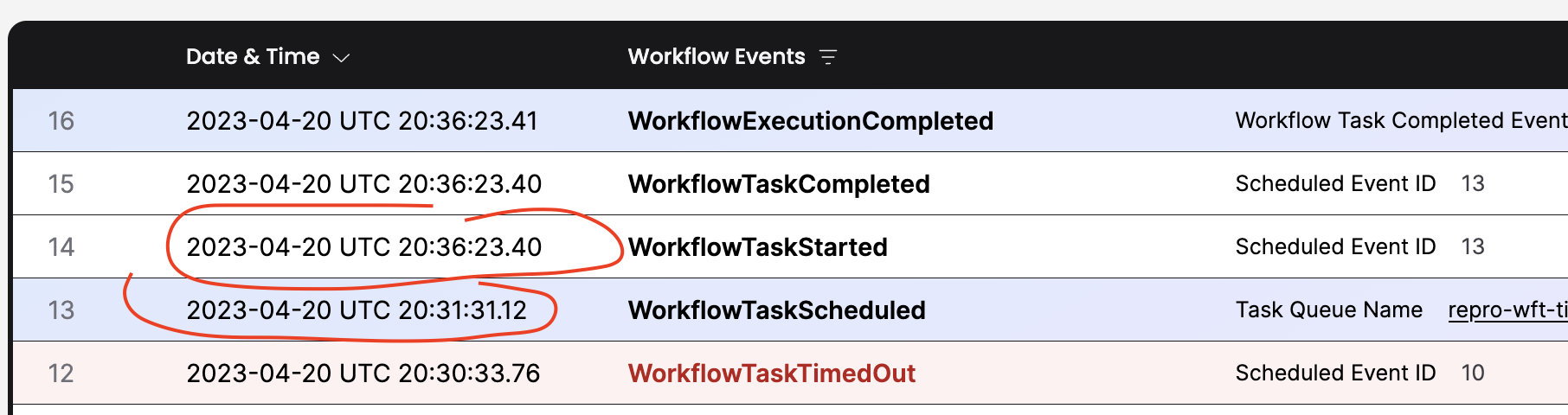
- After the WFT finally completes successfully, the WFT Scheduled and the WFT Started events are displayed one next to the other, with possibly large time delta between Scheduled and Started events. User once again thinks that this demonstrate a server issue (ie. the task remained idle for X minutes before the server finally dispatched it to a worker, even though workers were available at that time). In this case, the
attemptandstart-to-close timeoutare actually visible in the WFT Scheduled event details, but users hardly know / think about this, and even when they do see these values, they don't understand their meaning.
Describe the solution you'd like
We should provide clear visual indication that a WFT Scheduled event is being / has been retried.
A possible indication for this might be to add a single extra row in places where events have been collapsed. More specifically:
- right above the WFT Timed Out row then that is the latest event recorded in history and
DescribeWorkflowreportspendingWorkflowTask.state == "Scheduled" and pendingWorkflowTask.attempt > 1; - between the WFT Scheduled and WFT Started events rows when WFT Schedule's
attempt > 1.
That extra line could contain text such as:
... WorkflowTaskScheduled: retrying for the X time, due to WorkflowTaskTimedOut...
Contributor guide
No contributing guide indexed for this repository
First steps
- Read the whole issue, then the project's contributing guide.
- Comment on the issue to say you are picking it up — it saves two people doing the same work.
- Fork the repository and make your change on a branch.
- Open a pull request that references the issue number.
Research direction
Start by tracing the Temporal UI workflow history rendering and how DescribeWorkflow exposes pendingWorkflowTask.state and attempt. Implement the requested visual indication for collapsed retries above the latest WorkflowTaskTimedOut event and between scheduled and started events, then verify both attempt-based cases in the UI.
Written by the indexing model from the issue text.
Assessment
- Tech stack
- typescript
- Domain
- frontend
- Issue type
- Feature
- Difficulty
- 4/5
- Estimated time
- 3-5 days
- Activity status
- Stale
- Clarity
- Mostly clear
- Newbie friendliness
- 35/100