swagger-api / swagger-api/swagger-ui
Unlock/lock authorize operation button based on scopes
Nobody has claimed this yet.
- Dominant language
- JavaScript
- Stars
- 29k
- Forks
- 9.3k
- Avg merge
- 2d 23h
- Merged PRs (30d)
- 25
Description
Content & configuration
Swagger/OpenAPI definition:
# N/A
Swagger-UI configuration options:
SwaggerUI({
  // nothing relevant
})
Is your feature request related to a problem?
I was using fastapi lately and with it, Swagger-UI as well. I started to add authorization options and stumbled upon the following: let's say I have a simple OAuth2PasswordBearer authorization, in it's scope, 2 options: user and admin.
After I made some endpoints, I've got the following security settings in the OpenAPI json:
{
"security": [{"OAuth2PasswordBearer": [ "user"]}]
}
"security": [{"OAuth2PasswordBearer": [ "admin"]}]
"security": [{"OAuth2PasswordBearer": [ "user", "admin"]}]
After that, I fire up Swagger-UI:
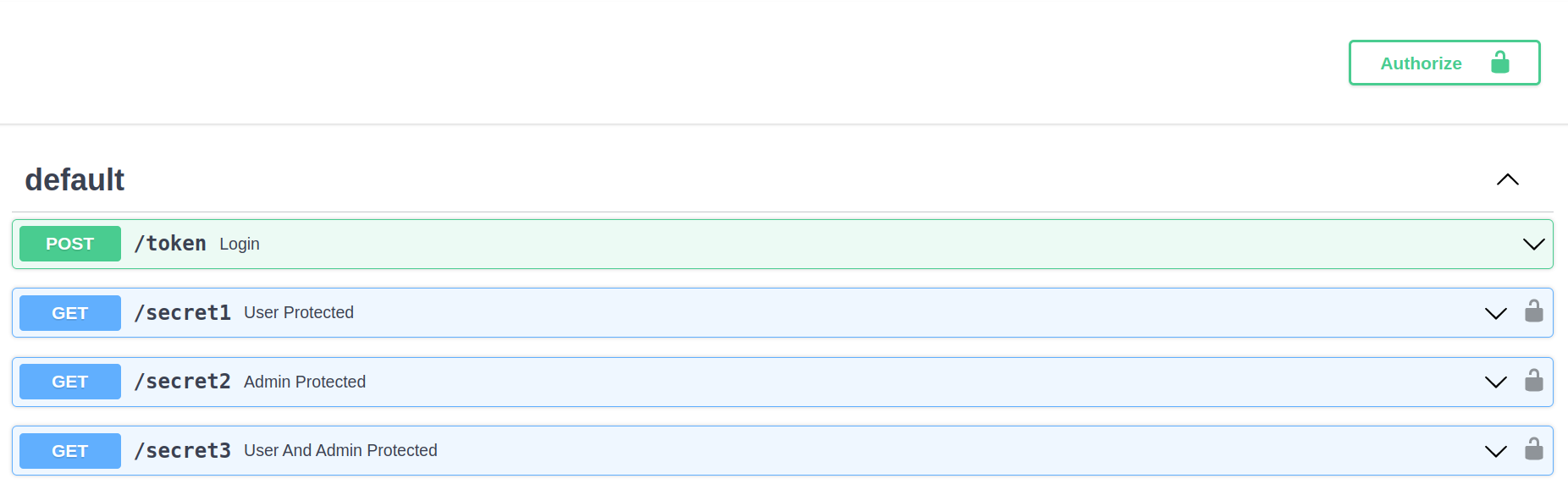
After I click at the Authorize button, provide the credentails and select only the user scope, at the main view, all of the operations' padlocks are getting unlocked.


And my issue is this, if I select only the user scope, then why all the padlocks are getting unlocked?
After some tweaks on the fastapi side, and making multiple OAuth2PasswordBearers, and providing differing scheme_names to them, I was able to get the following result:
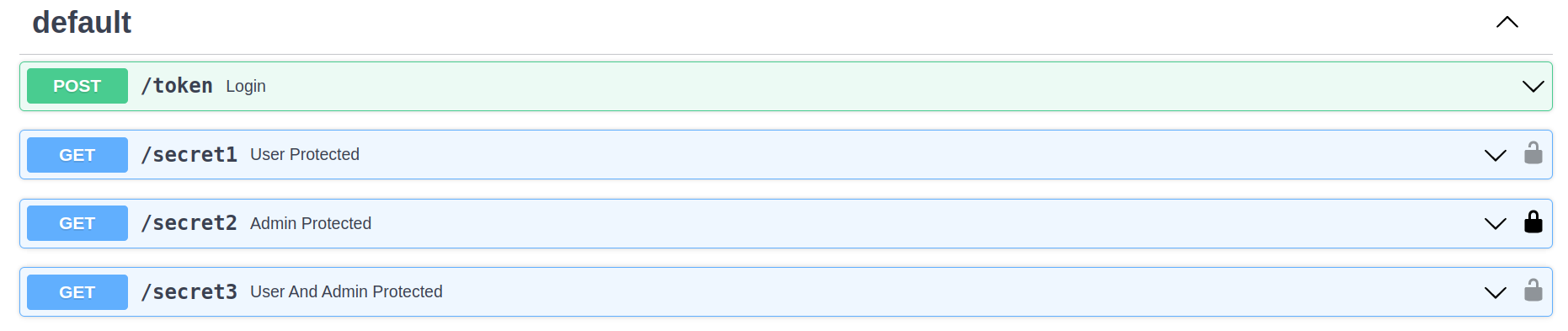
My changes resulted the following in the OpenAPI json:
"security": [{"user_bearer": ["user"]}]
"security": [{"admin_bearer": ["admin"]}]
"security": [{"shared_bearer": ["user", "admin"]}]
But sadly this defeats the purpose of "sharing" between security options, because let's say my user has a shared_bearer token with both user and admin scopes. I think it's reasonable to think it should be able to use it's token on endponints where either just user or admin scopes are required.
Describe the solution you'd like
I'd like to see a change where padlocks are getting unlocked considering a successful authorization's scopes
So if I select only the user scope (based on the example above), only those padlocks which require only the user scope, should get unlocked.
Contributor guide
First steps
- Read the whole issue, then the project's contributing guide.
- Comment on the issue to say you are picking it up — it saves two people doing the same work.
- Fork the repository and make your change on a branch.
- Open a pull request that references the issue number.
Research direction
Start by tracing the Swagger-UI Authorize button and operation padlock behavior against the OpenAPI security requirements shown in the issue. Verify how selected OAuth2 scopes are compared with requirements for user-only, admin-only, and combined operations; done means padlocks reflect those scope combinations, including shared bearer schemes.
Written by the indexing model from the issue text.
Assessment
- Tech stack
- javascript, openapi
- Domain
- api, frontend, security
- Issue type
- Feature
- Difficulty
- 4/5
- Estimated time
- 3-5 days
- Activity status
- Stale
- Clarity
- Mostly clear
- Newbie friendliness
- 42/100