swagger-api / swagger-api/swagger-ui
string($datetime) as DatePicker
Nobody has claimed this yet.
- Dominant language
- JavaScript
- Stars
- 29k
- Forks
- 9.3k
- Avg merge
- 2d 23h
- Merged PRs (30d)
- 25
Description
When a date comes as a string input and at the same time considering the different ways people type in a string-date. It's just meant to go wrong - especially when the correct date is everything to retrieve data.
My suggestion is that a very simple solution could be implemented. Add class"form-control" and type="date" to the input-tag.

Which will give:
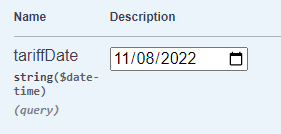
And clicking the calender icon:

Thank you 👍🏻
Contributor guide
First steps
- Read the whole issue, then the project's contributing guide.
- Comment on the issue to say you are picking it up — it saves two people doing the same work.
- Fork the repository and make your change on a branch.
- Open a pull request that references the issue number.
Research direction
Start by locating the DatePicker rendering path for string($datetime) inputs in Swagger UI and inspect the generated input element. Verify the change by opening the affected schema in Swagger UI and confirming that the control uses a date picker and preserves the expected date value.
Written by the indexing model from the issue text.
Assessment
- Tech stack
- javascript
- Domain
- frontend
- Issue type
- Feature
- Difficulty
- 2/5
- Estimated time
- 1-3 hours
- Activity status
- Stale
- Clarity
- Mostly clear
- Newbie friendliness
- 42/100