swagger-api / swagger-api/swagger-ui
Can't find a way to override the highlighted code color
Open
Nobody has claimed this yet.
- Dominant language
- JavaScript
- Stars
- 29k
- Forks
- 9.3k
- Avg merge
- 2d 23h
- Merged PRs (30d)
- 25
Description
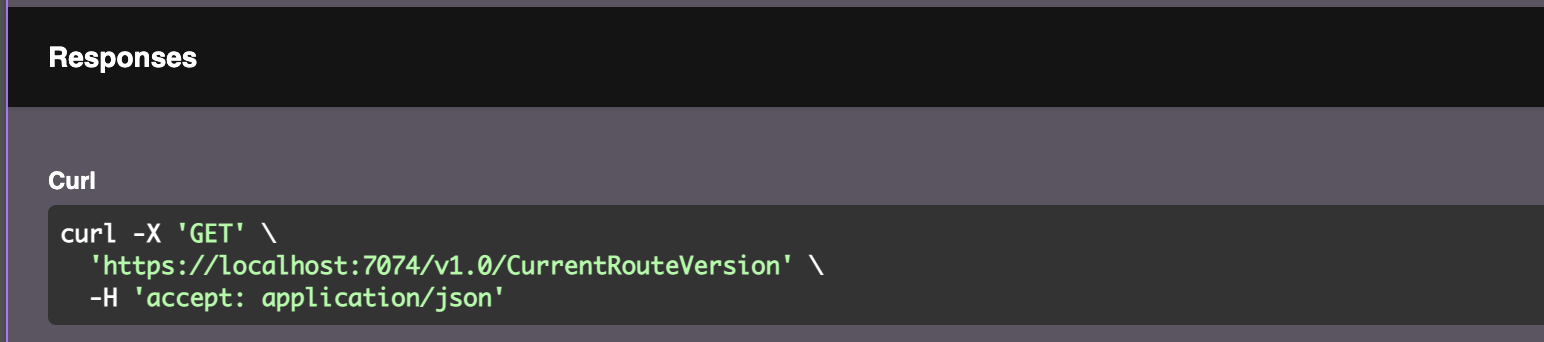
The lime green coloured code, I can't find any way to override it. All other text I can override. It has color rgb(162,252,162) could it be made possible to override such a strange color?
Contributor guide
First steps
- Read the whole issue, then the project's contributing guide.
- Comment on the issue to say you are picking it up — it saves two people doing the same work.
- Fork the repository and make your change on a branch.
- Open a pull request that references the issue number.
Research direction
Reproduce the highlighted-code styling in Swagger UI and inspect the generated HTML and CSS around the lime-green rgb(162,252,162) color. Determine where that color is applied and whether it can be overridden through the existing styling configuration. Done means users can change this color without affecting the other text colors.
Written by the indexing model from the issue text.
Assessment
- Tech stack
- css, javascript
- Domain
- frontend
- Issue type
- Bug
- Difficulty
- 3/5
- Estimated time
- 1-2 days
- Activity status
- Stale
- Clarity
- Needs clarification
- Newbie friendliness
- 35/100