swagger-api / swagger-api/swagger-ui
Copy and Download buttons overlap the text in response bodies
Open
@char0n is already working on this.
Since Oct 11, 2021.
cat: rendering
cat: style & presentation
version: 3.x
version: 4.x
- Dominant language
- JavaScript
- Stars
- 29k
- Forks
- 9.3k
- Avg merge
- 2d 23h
- Merged PRs (30d)
- 25
Description
Q&A (please complete the following information)
- OS: Windows 10
- Browser: Chrome (latest)
- Method of installation: https://editor.swagger.io
- Swagger-UI version: 3.52.0
- Swagger/OpenAPI version: any
Content & configuration
Example Swagger/OpenAPI definition:
openapi: 3.0.0
info:
  title: test
  version: 1.0.0
servers:
  - url: https://httpbin.org
paths:
  /base64/{value}:
    get:
      parameters:
        - in: path
          name: value
          required: true
          schema:
            type: string
          example: U3BhY2UgaXMgYmlnLiBSZWFsbHkgYmlnLiBZb3UganVzdCB3b24ndCBiZWxpZXZlIGhvdyB2YXN0bHksIGh1Z2VseSwgbWluZGJvZ2dsaW5nbHkgYmlnIGl0IGlzLiBJIG1lYW4sIHlvdSBtYXkgdGhpbmsgaXQncyBhIGxvbmcgd2F5IGRvd24gdGhlIHJvYWQgdG8gdGhlIGNoZW1pc3QsIGJ1dCB0aGF0J3MganVzdCBwZWFudXRzIHRvIHNwYWNlLg==
      responses:
        default:
          description: ''
Describe the bug you're encountering
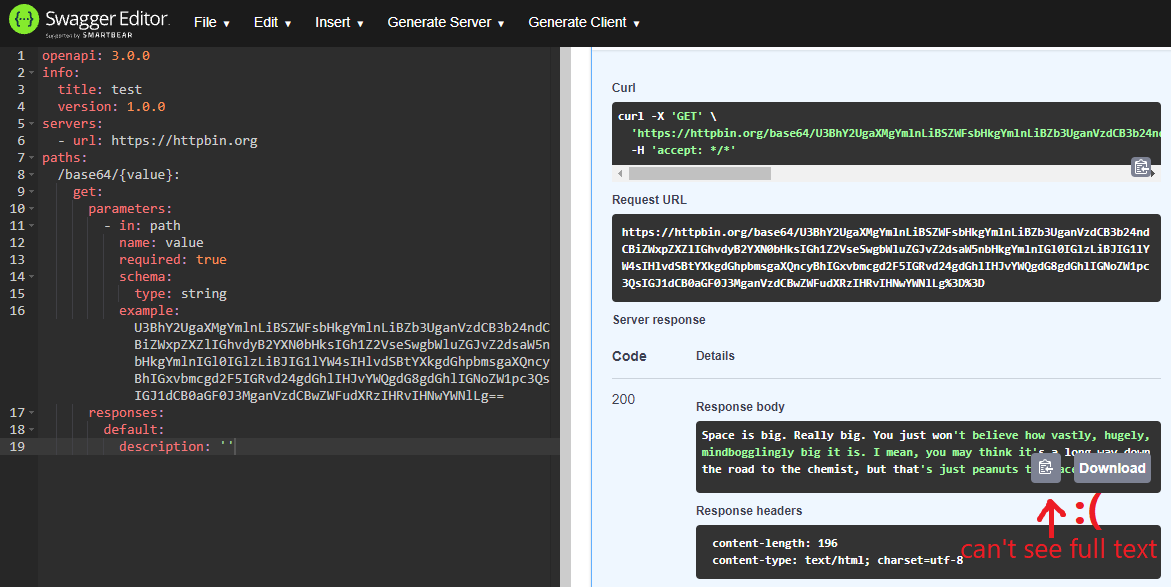
See the image below.
Responses from "try it out" are displayed with the "Copy" and "Download" buttons. But these buttons overlap the response content. This issue is especially prominent when using Swagger Editor or small screens and when the response is short (2-3 lines) and contains long lines (e.g. long error messages).
To reproduce...
Steps to reproduce the behavior:
- Go to https://editor.swagger.io.
- Paste the sample spec provided above.
- Test the request (leave the default values).
- See how the response is rendered.
Expected behavior
The response body text is fully visible and is not overlapped by other UI elements.
Screenshots
Additional context or thoughts
n/a
Contributor guide
First steps
- Read the whole issue, then the project's contributing guide.
- Comment on the issue to say you are picking it up — it saves two people doing the same work.
- Fork the repository and make your change on a branch.
- Open a pull request that references the issue number.
Assessment
This issue has not been assessed yet.