swagger-api / swagger-api/swagger-ui
Nested/recursive schemas not showing correctly in documentation
Nobody has claimed this yet.
- Dominant language
- JavaScript
- Stars
- 29k
- Forks
- 9.3k
- Avg merge
- 2d 23h
- Merged PRs (30d)
- 25
Description
Q&A
- OS: linux
- Browser: chrome
- Version: 92.0.4515.159
- Method of installation: dist assets
- Swagger-UI version: https://cdn.jsdelivr.net/npm/swagger-ui-dist@3/swagger-ui-bundle.js
- Swagger/OpenAPI version: OpenAPI 3.0.2
Example Swagger/OpenAPI definition:
openapi: 3.0.2
info:
  title: FastAPI
  version: 0.1.0
paths:
  /:
    post:
      summary: Root
      operationId: root__post
      requestBody:
        content:
          application/json:
            schema:
              $ref: '#/components/schemas/NodeInfo'
        required: true
      responses:
        '200':
          description: Successful Response
          content:
            application/json:
              schema: {}
        '422':
          description: Validation Error
          content:
            application/json:
              schema:
                $ref: '#/components/schemas/HTTPValidationError'
components:
  schemas:
    ConnectionInfo:
      title: ConnectionInfo
      required:
        - id
        - values
      type: object
      properties:
        id:
          title: Id
          type: string
        values:
          title: Values
          anyOf:
            - type: array
              items:
                anyOf:
                  - $ref: '#/components/schemas/ValueInfo'
                  - $ref: '#/components/schemas/NodeInfo'
            - $ref: '#/components/schemas/ValueInfo'
            - $ref: '#/components/schemas/NodeInfo'
    HTTPValidationError:
      title: HTTPValidationError
      type: object
      properties:
        detail:
          title: Detail
          type: array
          items:
            $ref: '#/components/schemas/ValidationError'
    NodeInfo:
      title: NodeInfo
      type: object
      properties:
        connections:
          title: Connections
          type: array
          items:
            $ref: '#/components/schemas/ConnectionInfo'
    ValidationError:
      title: ValidationError
      required:
        - loc
        - msg
        - type
      type: object
      properties:
        loc:
          title: Location
          type: array
          items:
            type: string
        msg:
          title: Message
          type: string
        type:
          title: Error Type
          type: string
    ValueInfo:
      title: ValueInfo
      required:
        - value
      type: object
      properties:
        value:
          title: Value
          anyOf:
            - type: string
            - type: number
            - type: integer
            - type: boolean
Describe the bug you're encountering
I am using Python and FastAPI to generate an API, and I noticed that the Swagger UI documentation of the API had some errors when showing nested recursive schemas. While debugging this issue, I tried taking the OpenAPI spec generated by FastAPI and running it at Swagger Editor, and the same issue appeared there despite the OpenAPI spec looking correct (to me, at least). This leads me to believe the issue is a Swagger UI problem. The above YAML file is a simplified/genericized version of a specification that exhibits the same issue.
To reproduce...
Steps to reproduce the behavior:
- Go to Swagger Editor
- Paste the above YAML to generate the documentation.
- Inspect the
ConnectionInfoSchema.- Expand the
Valuesobject inside it. - Expand the
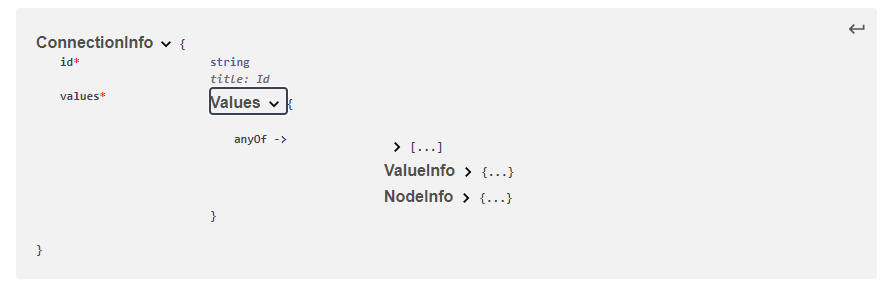
anyOflist inside that. - This should result in the first screenshot in the screenshots section below. Note that the intended type of
ValuesisanyOf(NodeInfo ValueInfo, list(anyOf(NodeInfo, ValueInfo))), and that's exactly what it shows.
- Expand the
- Inspect the
NodeInfoschema.- Expand the
Connectionsobject inside it. - Expand the
ConnectionInfoobject inside that. - Expand the
Valuesobject inside that. - Expand the
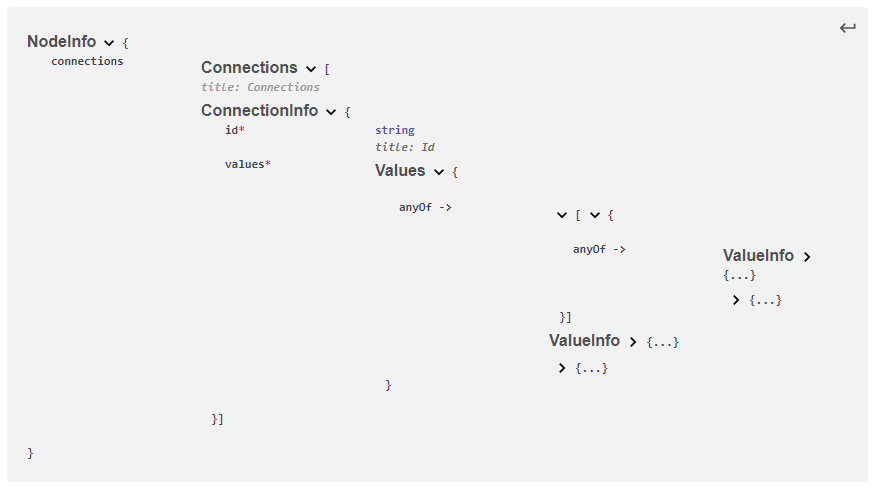
anyOflist inside that. - This should result in the second screenshot in the screenshots section below. Note that the types shown do not match those observed in Step 3 above- the
NodeInfoblocks are not represented correctly.
- Expand the
- Open and inspect the single API endpoint documentation.
- Open the Schema representation of the request.
- Expand the
NodeInfoobject. - Expand the
Connectionsobject inside it. - Expand the
ConnectionInfoobject inside that. - Expand the
Valuesobject inside that. - Expand the
anyOflist inside that. - Note that the types shown are incorrect here too in the same way that it was incorrect in Step 4 above.
Expected behavior
I would expect that the representation seen in Step 3 above would appear in the representations in Step 4 and 5. Alternatively, because it is recursive, I would be happy with just showing the name NodeInfo without the ability to expand it so it is clear that NodeInfo is an acceptable type instead of the empty object.
Screenshots
The schema representation of ConnectionInfo seen during Step 3 above. The fields are correctly typed.
The schema representation of NodeInfo seen during Step 4 (which is effectively the same as during Step 5). The fields are incorrectly typed.
Contributor guide
First steps
- Read the whole issue, then the project's contributing guide.
- Comment on the issue to say you are picking it up — it saves two people doing the same work.
- Fork the repository and make your change on a branch.
- Open a pull request that references the issue number.
Research direction
Reproduce the issue in Swagger Editor using the supplied OpenAPI YAML, following the ConnectionInfo and recursive NodeInfo expansion steps. Compare the schema representations for direct and nested recursive references, including the request schema. Done means recursive NodeInfo references remain correctly identified instead of appearing as incorrectly typed or empty objects.
Written by the indexing model from the issue text.
Assessment
- Tech stack
- javascript, openapi
- Domain
- documentation, frontend
- Issue type
- Bug
- Difficulty
- 4/5
- Estimated time
- 3-5 days
- Activity status
- Stale
- Clarity
- Mostly clear
- Newbie friendliness
- 35/100