swagger-api / swagger-api/swagger-ui
Accessibility problems with server, accordion
Nobody has claimed this yet.
- Dominant language
- JavaScript
- Stars
- 29k
- Forks
- 9.3k
- Avg merge
- 2d 23h
- Merged PRs (30d)
- 25
Description
Q&A (please complete the following information)
- OS: macOS
- Browser: chrome
- Version: [e.g. 22]
- Method of installation: npm
- Swagger-UI version: 3.25
- Swagger/OpenAPI version: OpenAPI 3.0
Content & configuration
Sample page: https://covidtracking.com/api
JSON: http://covidtracking.com/api-docs/COVID-tracking-endpoints-1.0-docs.json
Describe the bug you're encountering
There are two major accessibility problems with Swagger UI. We are tracking these issues in our own repo, but I'm reproducing those comments below:
Server dropdown is missing a label
Element
COVID Tracking API Sandbox
Note the above link actually goes to the element above it; this element didn't have an anchor link.
Maybe it should? Separate issue.
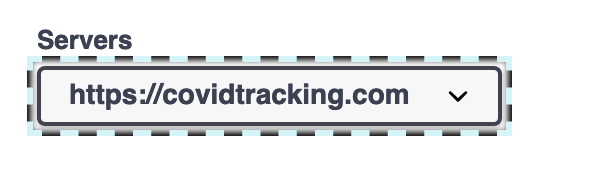
Expected Behaviour
Any form element should have a label so that it is announced with screenreaders. Before any form element, like this dropdown, I'd expect for the screen reader to announce its label.
Actual Behaviour
The screen reader announces that I'm about to go into a popup button and reads the field, which is the URL. I have no context for what it is unless I can visually see the faux label or I navigate back. This prevents users who are tabbing to interactive elements to know what this is.
Recommendation
Move the visual <span> that is currently outside of the <label> element inside of the <label> element so it's properly announced. The <label> also shouldn't nest the <select> element inside of it. It should read:
<label>
</label>
<select>
...
Resources
Additional Note
If there is only one server, this element should probably not be rendered at all.
Accordion content is inaccessible with keyboard
Element
Any dropdown in the list of endpoints
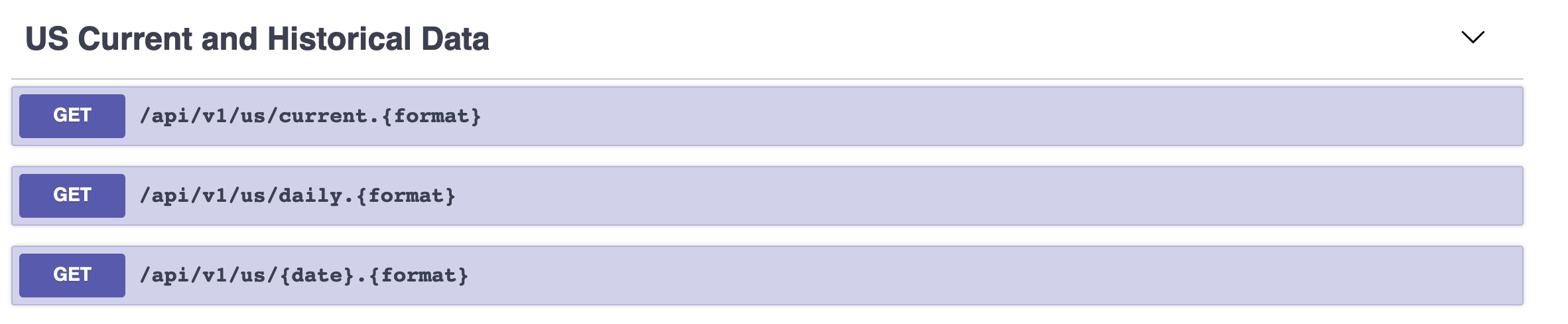
Expected Behaviour
The ability to tab to the GET elements by keyboard.
Actual Behaviour
Each of these GET elements is not tabbable. I can only access them by navigating by mouse.
Recommendation
Make all get elements buttons if possible. If it can be a button, that would be best, as it'll bake in all the button goodness.
If it must be a div for some reason, it needs to inherit a role="button" and also get a lot of aria properties to make it function like a button.
Resources
Contributor guide
First steps
- Read the whole issue, then the project's contributing guide.
- Comment on the issue to say you are picking it up — it saves two people doing the same work.
- Fork the repository and make your change on a branch.
- Open a pull request that references the issue number.
Research direction
Start by reproducing the server dropdown and endpoint accordion on the linked sample page with a keyboard and screen reader. Inspect the rendered form and endpoint controls, then verify that the server has an announced label and that endpoint actions are keyboard-focusable and operable.
Written by the indexing model from the issue text.
Assessment
- Tech stack
- javascript
- Domain
- accessibility, frontend
- Issue type
- Bug
- Difficulty
- 3/5
- Estimated time
- 1-2 days
- Activity status
- Stale
- Clarity
- Mostly clear
- Newbie friendliness
- 38/100