swagger-api / swagger-api/swagger-ui
[Modified value] sometimes appears after switching between examples
Nobody has claimed this yet.
- Dominant language
- JavaScript
- Stars
- 29k
- Forks
- 9.3k
- Avg merge
- 2d 23h
- Merged PRs (30d)
- 25
Description
Q&A (please complete the following information)
- OS: Windows 10
- Browser: Chrome 76
- Method of installation: https://editor.swagger.io
- Swagger-UI version: 3.23.4
- Swagger/OpenAPI version: OpenAPI 3.0
Content & configuration
Example Swagger/OpenAPI definition:
openapi: 3.0.0
info:
  title: test
  version: 1.0.0

paths:
  /foo:
    post:
      requestBody:
        content:
          application/json:
            schema:
              $ref: '#/components/schemas/MyModel'
            examples:
              '0':
                value:
                  message: test
              '1':
                value:
                  message: hello, world
          application/xml:
            schema:
              $ref: '#/components/schemas/MyModel'
      responses:
        '200':
          description: ok

components:
  schemas:
    MyModel:
      type: object
      properties:
        message:
          type: string
      xml:
        name: root
Describe the bug you're encountering
If the request body has several media types with examples, switching between those media types sometimes adds an extra [Modified value] item to the examples list. This happens outside the "try it out" mode.
To reproduce...
Steps to reproduce the behavior:
- Go to https://editor.swagger.io and paste the example above.
- Expand
POST /foo. - From the "Examples" list, select the example
1. - Switch to
application/xml. (Note the example is not updated to XML - this is issue #5460). - Switch back to
application/json. - Open the "Examples" list.
Expected behavior
The example list should contain only "0" and "1" - i.e. the examples defined in the spec.
Actual behavior
The examples list contains "[Modified value]" even though we didn't modify anything. The "[Modified value]" example makes sense during "try it out" only.
Screenshots
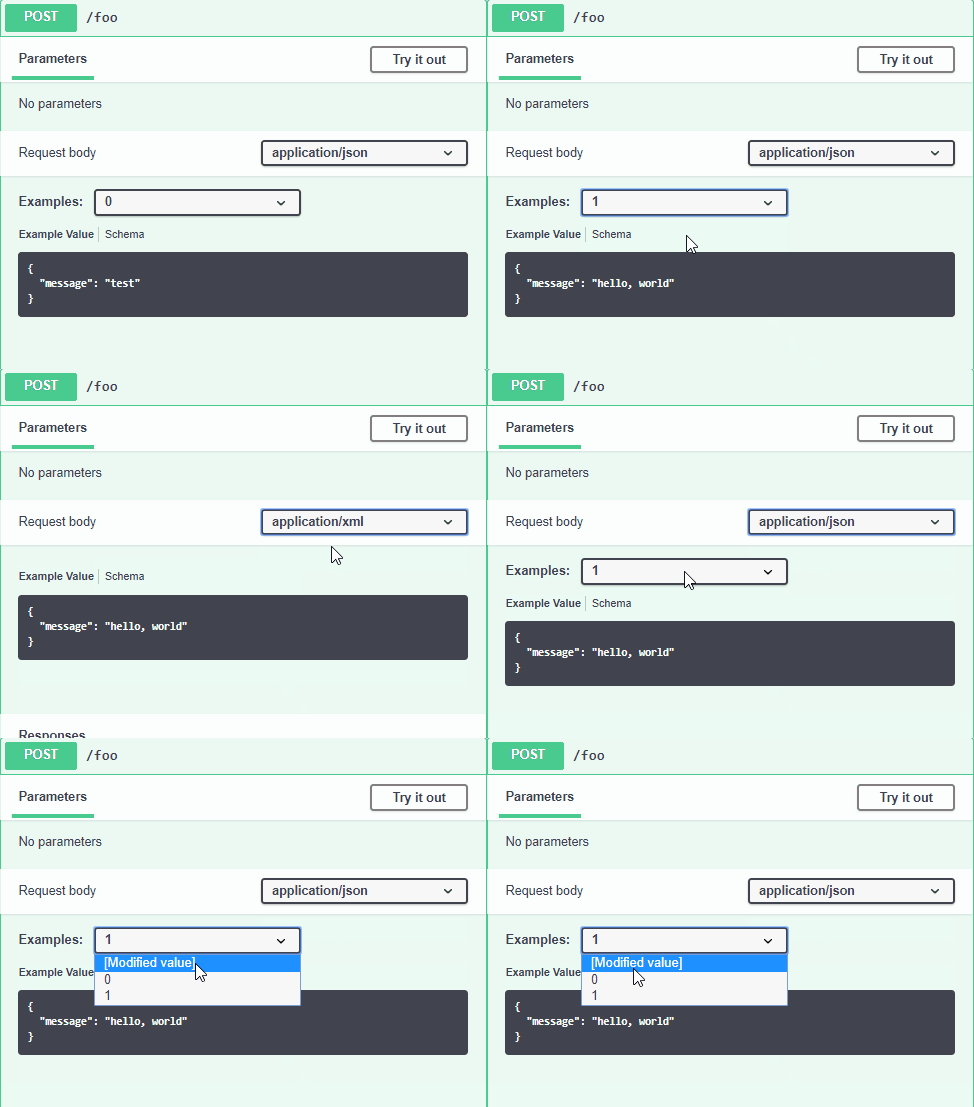
Contributor guide
First steps
- Read the whole issue, then the project's contributing guide.
- Comment on the issue to say you are picking it up — it saves two people doing the same work.
- Fork the repository and make your change on a branch.
- Open a pull request that references the issue number.
Research direction
Start at the Examples list in Swagger UI using the YAML definition and reproduction steps at editor.swagger.io. Switch between application/json and application/xml after selecting example 1, then inspect how the examples list changes outside "try it out" mode. Done means switching media types leaves only the spec-defined examples "0" and "1", without adding "[Modified value]".
Written by the indexing model from the issue text.
Assessment
- Tech stack
- javascript
- Domain
- frontend
- Issue type
- Bug
- Difficulty
- 3/5
- Estimated time
- 1-2 days
- Activity status
- Stale
- Clarity
- Clearly specified
- Newbie friendliness
- 48/100