swagger-api / swagger-api/swagger-ui
Response body with ISO-8859-1 chars are not display correct
Nobody has claimed this yet.
- Dominant language
- JavaScript
- Stars
- 29k
- Forks
- 9.3k
- Avg merge
- 2d 23h
- Merged PRs (30d)
- 25
Description
Q&A (please complete the following information)
- OS: macOS | Windows 10
- Browser: chrome, firefox etc.
- Version: all
- Method of installation: npm, or dist assets
- Swagger-UI version: 3.23.4
- Swagger/OpenAPI version: OpenAPI 3.0
Content & configuration
Example Swagger/OpenAPI definition:
paths:
  /search.query:
    get:
      operationId: query
      summary: Search API
      description: ...
      parameters:
        - in: query
          description: Search query
          name: search
          schema:
            type: string
      responses:
        "200":
          description: No response was specified
Swagger-UI configuration options:
      const ui = SwaggerUIBundle({
        urls: [{
          url: "api-docs/search.yaml",
          name:"search"
        }],
        dom_id: '#swagger-ui',
        deepLinking: true,
        validatorUrl: null,
        presets: [
          SwaggerUIBundle.presets.apis,
          SwaggerUIStandalonePreset
        ],
        plugins: [
          SwaggerUIBundle.plugins.DownloadUrl
        ],
        layout: "StandaloneLayout"
      })
Describe the bug you're encountering
If the API returns contet that isn't encoded with UTF-8 the display of the response body is not correct (see screenshot). The server returns a ISO-8859-1 encoded string and the german special chars (äüöß) are not displayed correct.
Expected behavior
The response body should be encoded with ISO-8859-1.
Screenshots
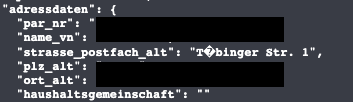
Should be "Tübinger Str. 1"
Contributor guide
First steps
- Read the whole issue, then the project's contributing guide.
- Comment on the issue to say you are picking it up — it saves two people doing the same work.
- Fork the repository and make your change on a branch.
- Open a pull request that references the issue number.
Research direction
No source file or test is named in the issue. Start by reproducing the response-rendering problem with the supplied OpenAPI definition and Swagger UI configuration, using an ISO-8859-1 response containing “Tübinger Str. 1”; done means the German characters display correctly rather than as corrupted text.
Written by the indexing model from the issue text.
Assessment
- Tech stack
- javascript
- Domain
- frontend
- Issue type
- Bug
- Difficulty
- 3/5
- Estimated time
- 1-2 days
- Activity status
- Stale
- Clarity
- Mostly clear
- Newbie friendliness
- 35/100