swagger-api / swagger-api/swagger-ui
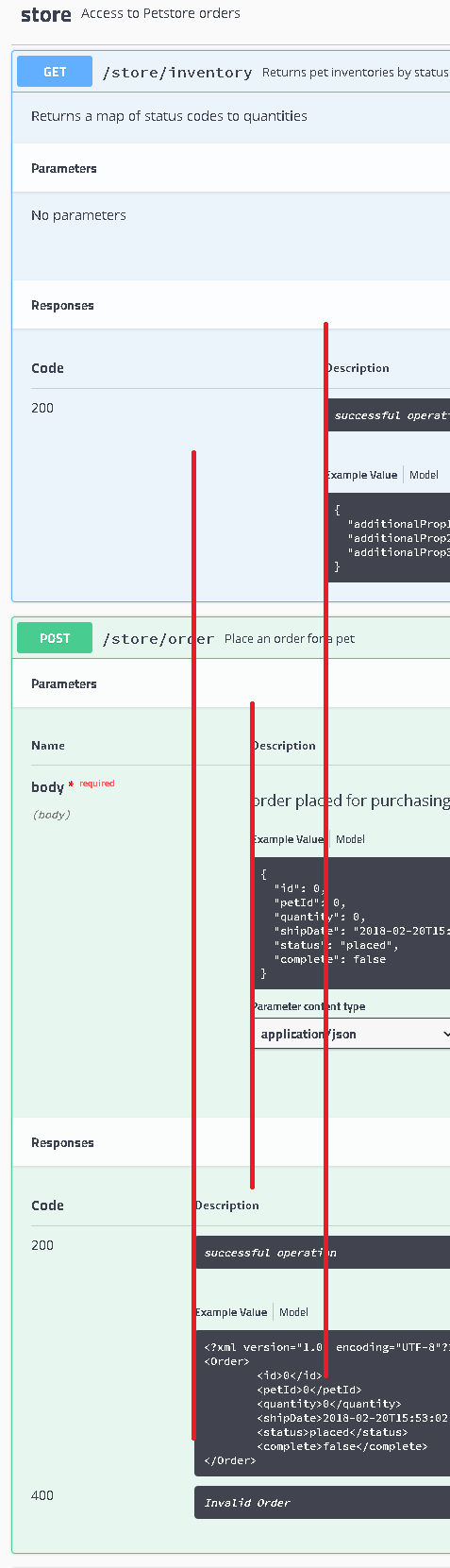
Description alignment
Open
Nobody has claimed this yet.
cat: style & presentation
needs: UX/design input
type: bug
- Dominant language
- JavaScript
- Stars
- 29k
- Forks
- 9.3k
- Avg merge
- 2d 23h
- Merged PRs (30d)
- 25
Description
| Q | A |
|---|---|
| Bug or feature request? | Style Bug |
| Which Swagger/OpenAPI version? | 2.0 |
| Which Swagger-UI version? | Latest |
| How did you install Swagger-UI? | PetStore |
| Which browser & version? | Chrome & Firefox |
| Which operating system? | Win10 |
Demonstration API definition
Expected Behavior
All the descriptions should be left aligned
Current Behavior
The descriptions are not aligned
Contributor guide
First steps
- Read the whole issue, then the project's contributing guide.
- Comment on the issue to say you are picking it up — it saves two people doing the same work.
- Fork the repository and make your change on a branch.
- Open a pull request that references the issue number.
Research direction
Open the linked PetStore demonstration in Swagger UI and compare the alignment of the displayed descriptions. Trace the styles or rendering entry point responsible for those descriptions; done means all descriptions are consistently left aligned in the affected view.
Written by the indexing model from the issue text.
Assessment
- Tech stack
- css, javascript
- Domain
- frontend
- Issue type
- Bug
- Difficulty
- 2/5
- Estimated time
- 1-3 hours
- Activity status
- Stale
- Clarity
- Mostly clear
- Newbie friendliness
- 35/100