swagger-api / swagger-api/swagger-codegen
Docker for Windows - Container permissions issue
Nobody has claimed this yet.
- Dominant language
- Mustache
- Stars
- 17.8k
- Forks
- 6k
- PR merge metrics
- No merged PRs in 30d
Description
Description
I'm doing my development in VS Code on Windows and have ran into what I think is a permissions issue in the container that is specific to an ongoing issue with Docker for Windows: https://github.com/docker/for-win/issues/497 combined with a pull request here: https://github.com/swagger-api/swagger-codegen/pull/5702 that changed the user running the container.
In Docker for Windows, if a drive is mounted and the container is not run as root, then the user running the container has permission issues with the mount. In this case, when I run ./run-in-docker.sh mvn package, it causes a folder to show up in VS Code that is a named
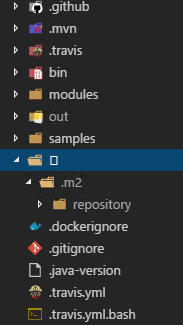
Because this folder shows up, Git tries to add it in unless I specifically add to .gitignore.
Swagger-codegen version
2.4.0
Command line used for generation
./run-in-docker.sh mvn package
Steps to reproduce
- Run Docker for Windows
- Use VS Code
- run
./run-in-docker.sh mvn package - Special character named folder may show up.
Suggest a fix/enhancement
Not sure on a fix/enhancement exactly. I can workaround the issue by doing something like this in the windows command line.
docker.exe run --rm -it -w /gen -e GEN_DIR=/gen -e MAVEN_CONFIG=/var/maven/.m2 -v "${PWD}:/gen" -v "${HOME}/.m2/repository:/var/maven/.m2/repository" --entrypoint "/gen/docker-entrypoint.sh" maven:3-jdk-7 mvn package
as you can see, i'm basically mimicking run-in-docker.sh but i'm eliminating -u "$(id -u):$(id -g)" and the container will essentially run as root.
Contributor guide
First steps
- Read the whole issue, then the project's contributing guide.
- Comment on the issue to say you are picking it up — it saves two people doing the same work.
- Fork the repository and make your change on a branch.
- Open a pull request that references the issue number.
Research direction
Start with run-in-docker.sh and docker-entrypoint.sh, then reproduce the Windows mount behavior using ./run-in-docker.sh mvn package and compare it with the documented root-running workaround. Done means the generated workspace no longer contains the special-character folder or requires adding it to .gitignore.
Written by the indexing model from the issue text.
Assessment
- Tech stack
- docker, shell
- Domain
- devops, infrastructure
- Issue type
- Bug
- Difficulty
- 4/5
- Estimated time
- 3-5 days
- Activity status
- Stale
- Clarity
- Needs clarification
- Newbie friendliness
- 25/100