ModalElement "Overlay Rectangle" doesn't fill whole screen when window is resized
Nobody has claimed this yet.
- Dominant language
- C#
- Stars
- 7.8k
- Forks
- 1.2k
- Avg merge
- 2d 17h
- Merged PRs (30d)
- 49
Description
Release Type: Release
Version: v4.0.0.1-beta2-0928
Platform(s): Windows
Describe the bug
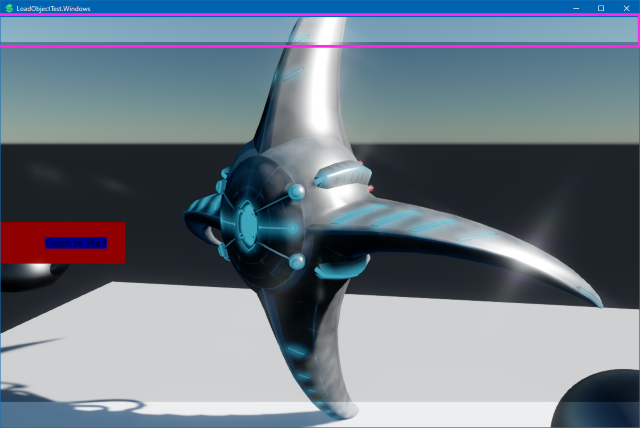
When using a ModalElement to bring up some UI and prevent interaction with the UI behind it, ModalElementRenderer draws a rectangle that's supposed to cover everything behind it. (to shade it a bit)
However, if the window is resizable with Game.Window.AllowUserResizing = true;, this rectangle doesn't fill the whole window properly when it's taller than wider. Not sure why this is. I think the drawing code is here:
Stride.UI/Renderers/DefaultModalElementRenderer.cs
I have noticed that the 2d UI virtual resolution seems to only scale proportional to window width. (the size of 2d items changes based on window width, but it does not change based on window height)
To Reproduce
Steps to reproduce the behavior:
(rewriting a new example test case)
Expected behavior
Expected the modal blocking panel to stay filling the window as it's resized.
Screenshots
I have highlighted the top bar in purple on the screenshot below, and I've provided a youtube video demonstration.
Video: Youtube - visual artifacts resizing a game window - Stride v4.0.0.1-beta2-0928
Contributor guide
First steps
- Read the whole issue, then the project's contributing guide.
- Comment on the issue to say you are picking it up — it saves two people doing the same work.
- Fork the repository and make your change on a branch.
- Open a pull request that references the issue number.
Research direction
Start in sources/engine/Stride.UI/Renderers/DefaultModalElementRenderer.cs, especially the drawing code linked in the report, and reproduce the issue with a resizable window using Game.Window.AllowUserResizing = true. Compare the overlay bounds when the window is taller than wide and while resizing. Done means the modal blocking rectangle continues to fill the entire window.
Written by the indexing model from the issue text.
Assessment
- Tech stack
- csharp
- Domain
- game-dev
- Issue type
- Bug
- Difficulty
- 3/5
- Estimated time
- 1-2 days
- Activity status
- Stale
- Clarity
- Mostly clear
- Newbie friendliness
- 38/100