Unable to install Visual Studio plugin/Unable to fetch documentation
Nobody has claimed this yet.
- Dominant language
- C#
- Stars
- 7.8k
- Forks
- 1.2k
- Avg merge
- 2d 17h
- Merged PRs (30d)
- 49
Description
Release Type: Official Release
Version: Launcher v4.0.2
Platform(s): Windows (Stride Launcher)
Describe the bug
When opening the Stride launcher I am unable to install the Visual Studio plugin. No error or explanation is given on why it is unable to install.
The launcher is also unable to fetch documentation and latest news
To Reproduce
Steps to reproduce the behavior:
- Download/Install Stride
- Run Stride Launcher
Expected behavior
Able to install Visual Studio plugin, if its unable to download be given a reason why (error code, etc..)
Screenshots
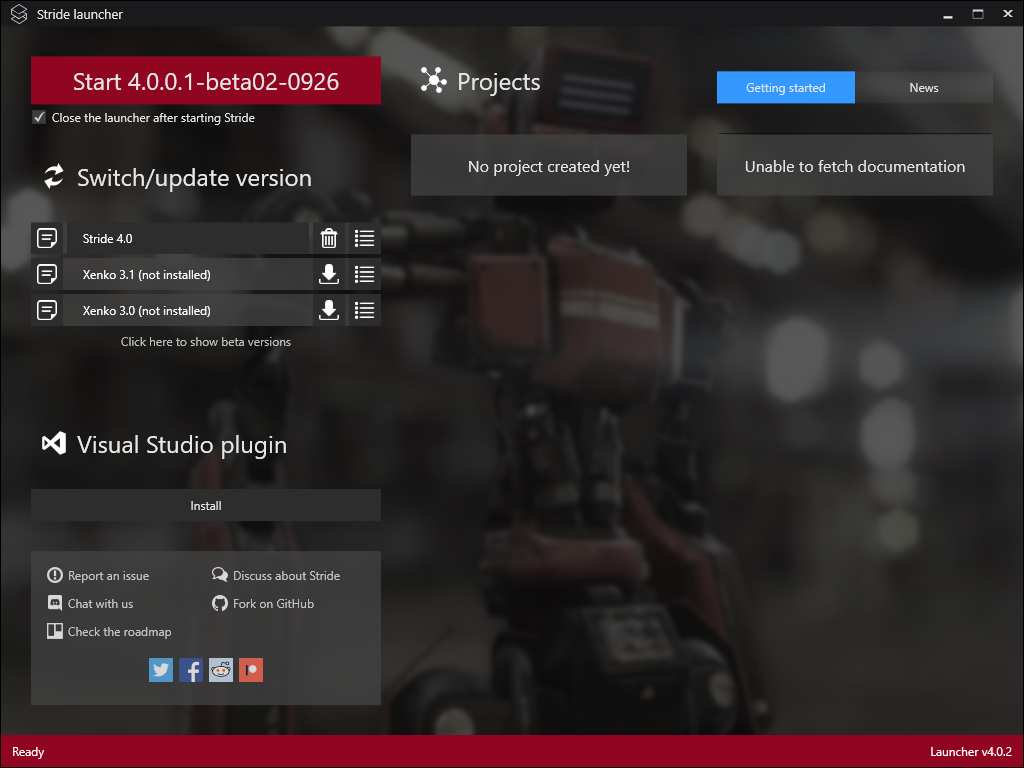
Log and callstacks
No errors given
Additional context
Microsoft Visual Studio Community 2019
Version 16.5.4
Contributor guide
First steps
- Read the whole issue, then the project's contributing guide.
- Comment on the issue to say you are picking it up — it saves two people doing the same work.
- Fork the repository and make your change on a branch.
- Open a pull request that references the issue number.
Research direction
Start by reproducing the issue with Stride Launcher v4.0.2 on Windows and inspect the launcher paths responsible for Visual Studio plugin installation, documentation fetching, and latest-news retrieval. Done means these operations succeed or display a useful error explaining the failed download; the issue provides no file or test names.
Written by the indexing model from the issue text.
Assessment
- Tech stack
- csharp
- Domain
- documentation, tooling
- Issue type
- Bug
- Difficulty
- 4/5
- Estimated time
- 3-5 days
- Activity status
- Stale
- Clarity
- Needs clarification
- Newbie friendliness
- 25/100