[UI] Dropdown UI Element
Nobody has claimed this yet.
- Dominant language
- C#
- Stars
- 7.8k
- Forks
- 1.2k
- Avg merge
- 2d 17h
- Merged PRs (30d)
- 49
Description
As the title specifies, a Drop-down UI element (also known as ComboBox in WinForms) specifically a DropDownList).
Reference image (from MSDN, Windows API documentation)
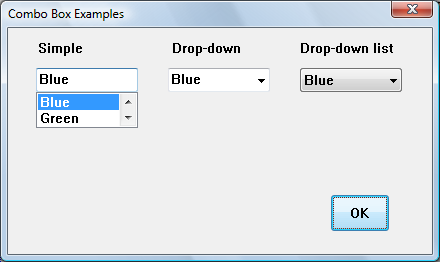
This is possible to create on scratch, but it creates clutter for example. when I create a settings page with multiple DDs.
I'm creating this issue since I'm considering writing a DropDownList component for Stride.UI.Controls (so to discuss how it could be implemented).
Contributor guide
First steps
- Read the whole issue, then the project's contributing guide.
- Comment on the issue to say you are picking it up — it saves two people doing the same work.
- Fork the repository and make your change on a branch.
- Open a pull request that references the issue number.
Research direction
Start by reviewing the Stride.UI.Controls area and the referenced MSDN ComboBox image to understand the proposed DropDownList component. The issue currently leaves implementation details and scope open, so discuss the desired behavior and design before identifying the files and tests needed. Done would mean an agreed design and a completed, usable dropdown component.
Written by the indexing model from the issue text.
Assessment
- Tech stack
- csharp
- Domain
- frontend, game-dev
- Issue type
- Feature
- Difficulty
- 5/5
- Estimated time
- Over a week
- Activity status
- Quiet
- Clarity
- Needs clarification
- Newbie friendliness
- 35/100